Scientific Calculator (Evaluate Expressions Step by Step)
Fractions & numbersFreeNo sign-up
To evaluate an expression with a scientific calculator, type it as written, pick degrees or radians, and press =. For example, 5 + 2 × (8 − 3)² ÷ 10 − sin 30° = 9.5: the parentheses give 5, the sine gives 0.5, the power gives 25, then 2 × 25 ÷ 10 = 5, and 5 + 5 − 0.5 = 9.5.
Order of operations, step by step (7 steps)
-
Parentheses: Subtract8 − 3 = 5Work inside parentheses first, from the innermost pair out.= 5 + 2 × 52 ÷ 10 − sin(30°)
-
Functionsin(30°) = 0.5Evaluate the function on the value inside its brackets.= 5 + 2 × 52 ÷ 10 − 0.5
-
Exponent52 = 25Powers and roots come before multiplication and division.= 5 + 2 × 25 ÷ 10 − 0.5
-
Multiply2 × 25 = 50Multiply and divide from left to right.= 5 + 50 ÷ 10 − 0.5
-
Divide50 ÷ 10 = 5= 5 + 5 − 0.5
-
Add5 + 5 = 10Add and subtract from left to right.= 10 − 0.5
-
Subtract10 − 0.5 = 9.5
History (0)

How to use the scientific calculator
- Type the expression with your keyboard or tap the keys. Use ^ for powers, ( ) for grouping and a comma inside nPr( ), nCr( ) and root( ).
- Choose DEG, RAD or GRAD before you use sin, cos or tan. The mode is shown in the display.
- Press = or Enter. The answer appears in the display and below it, with the order-of-operations steps written out.
- Use Fraction ⇔ decimal (or the S⇔D key) to switch between 841/81 and 10.3827160494, and Sci or Eng to show every answer in scientific or engineering notation.
The answer updates as you type. After =, pressing an operator key continues from the last answer (Ans), and pressing a digit starts a new problem. Your last 20 answers are kept under History; tap one to reuse it.
What each scientific calculator key does
| Key | What it does | Example | Result |
|---|---|---|---|
| x², x³, xʸ | Powers | 2^10 | 1,024 |
| √, ∛, ⁿ√x | Square, cube and nth roots | root(81, 4) | 3 |
| sin, cos, tan | Trig functions (DEG, RAD or GRAD) | tan(45) in DEG | 1 |
| 2nd + sin | Inverse trig, sin⁻¹ | sin⁻¹(0.5) in DEG | 30 |
| hyp + sin | Hyperbolic sine, sinh | sinh(0) | 0 |
| log, ln, logb | Base 10, base e, any base | log_2(32) | 5 |
| 10ˣ, eˣ | Undo log and ln | e^(ln(5)) | 5 |
| n! | Factorial | 5! | 120 |
| nPr, nCr | Permutations and combinations | nCr(5, 2) | 10 |
| EXP | Times 10 to a power | 6.02E23 × 2 | 1.204 × 10²⁴ |
| % | Divide by 100 | 25% × 80 | 20 |
| M+, M−, MR, MC | Add to, subtract from, recall and clear memory | 12 M+, 5 M−, MR | 7 |
Order of operations on a scientific calculator
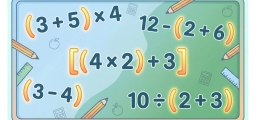
A scientific calculator follows the order of operations (PEMDAS): parentheses first, then functions and exponents, then multiplication and division from left to right, then addition and subtraction from left to right. The step list under every answer shows exactly which part was done first and why.
Two rules catch many students. First, −3² means −(3²) = −9, because the exponent comes before the minus sign; type (−3)^2 to get 9. Second, 6 ÷ 2(1 + 2) is read left to right as 6 ÷ 2 × 3 = 9. Some handheld models give the hidden multiplication higher priority and show 1, so add parentheses whenever you mean something specific. The order of operations calculator explains PEMDAS in more detail.
Scientific calculator examples
Example 1: a fraction raised to a power
Evaluate (3 + 2/9)². Inside the parentheses, divide first: 2/9 ≈ 0.2222, so 3 + 2/9 = 29/9. Squaring gives 841/81 ≈ 10.38. Press Fraction ⇔ decimal to see the exact fraction 841/81.
Example 2: the same sine in two modes
In degree mode, sin(30) = 0.5. In radian mode the calculator reads 30 as 30 radians, so sin(30) ≈ −0.988. If a trig answer looks strange, check the DEG/RAD setting first. In radian mode, sin(π/6) = 0.5, because π/6 radians equals 30°.
Example 3: counting with nCr and nPr
How many 5-card hands come from a 52-card deck? Order does not matter, so use combinations: nCr(52, 5) = 2,598,960. If order matters, such as gold, silver and bronze among 10 runners, use permutations: nPr(10, 3) = 10 × 9 × 8 = 720.
Example 4: scientific notation
Type 6.02E23 × 2. The EXP key enters “times 10 to the power”, so the answer is 1.204 × 10²⁴. Answers of 10¹² or more, or smaller than 0.000001, switch to scientific notation automatically, and the Sci button shows every answer that way.
Common mistakes on a scientific calculator
| Mistake | What happens | Fix |
|---|---|---|
| Wrong angle mode | sin(30) gives −0.988 instead of 0.5 | Check DEG/RAD before trig |
| Missing parentheses around a fraction | 1/2x is read as (1/2) × x | Type 1/(2x) when x is in the denominator |
| Squaring a negative without brackets | −3^2 = −9 | Type (−3)^2 = 9 |
| Rounding too early | Small errors grow in later steps | Use Ans or memory to keep full precision |
| Ignoring an impossible result | A negative length or a probability above 1 | Estimate first and compare |
Using a scientific calculator for homework and tests
Before you type, copy the problem carefully, decide whether it needs degrees or radians, and estimate the answer. If 48 × 21 should be about 1,000, a result of 10,080 tells you a key was pressed twice.
When you read the result, follow the steps: they show which operation came first and the value at each stage. If your hand-worked answer differs, find the first step where they disagree. That is usually the mistake.
Work by hand while you learn a new method, then use the calculator to check. On timed tests, use it for long arithmetic but still write the setup. Most basic scientific calculators are non-programmable, but exam rules differ, so check your test’s calculator policy.
Scientific calculator practice quiz: 10 questions
Test yourself with 10 multiple-choice questions. Choose an answer and press Submit to see if you are right and why. Your score appears at the end.
Exponent first: 2^2 = 4. Then multiply: 4 × 4 = 16. Then add: 3 + 16 = 19. Working left to right gives the wrong 28.
The exponent comes before the minus sign, so −3^2 = −(3^2) = −9. To square −3, type (−3)^2 = 9.
sin 30° = 0.5. The value −0.988 is sin of 30 radians, which you get if the calculator is in radian mode.
10^3 = 1000, so log(1000) = 3. The value 6.908 is ln(1000), the natural log.
nCr(6, 2) = 6 × 5 ÷ 2! = 15. nPr(6, 2) = 30 counts ordered pairs, so it is twice as large.
6! = 6 × 5 × 4 × 3 × 2 × 1 = 720. Adding the numbers (21) or squaring 6 (36) are common slips.
E−3 means × 10^−3, so move the decimal point 3 places left: 4.5 × 10^−3 = 0.0045.
Square the numerator and the denominator: 2^2/3^2 = 4/9. Squaring only the top gives 4/3.
(−4)^3 = −64, so ∛(−64) = −4. Unlike square roots, cube roots of negative numbers are real.
sin 90° = 1, so sin⁻¹(1) = 90 in degree mode. 1.5708 is the same angle in radians (π/2).
Quiz complete
Frequently asked questions
What is a scientific calculator used for?
It handles powers, roots, logarithms, trigonometry, factorials, permutations and combinations, and scientific notation. Students use one from pre-algebra through precalculus, and in chemistry and physics, where very large and very small numbers are common.
Is a scientific calculator the same as a graphing calculator?
No. A scientific calculator evaluates expressions and gives numbers. A graphing calculator also plots equations and is usually programmable. For graphs, use the free graphing calculator.
How do you use a scientific calculator for fractions?
Wrap each fraction in parentheses, such as (1/2) + (1/3) or (2/3)^2. Then press S⇔D to switch the answer between 5/6 and 0.8333. For mixed numbers and fraction steps, use the fraction calculator.
How do you change the mode on a scientific calculator?
Tap DEG, RAD or GRAD at the top of the calculator. Degree mode treats sin(30) as 30°, which gives 0.5. Radian mode treats it as 30 radians, which gives about −0.988. Gradians split a right angle into 100.
How do you enter scientific notation?
Use the EXP key, which types E. For example, 3E8 means 3 × 10⁸. To convert numbers to and from scientific notation, see the scientific notation converter.
Related calculators
- Graphing calculator: plot functions and find intersections
- Order of operations calculator: PEMDAS step by step
- Fraction calculator: add, subtract, multiply and divide fractions
- Scientific notation converter: standard form and E notation
More fractions & numbers calculators

Related to This Article
More math articles
- A Comprehensive Collection of Free TASC Math Practice Tests
- 5th Grade STAAR Math Worksheets: Free Printable PDFs
- The Best Grade 6 ELA Practice Tests for Oregon Students
- Multi-Step Equations Worksheet with Answers
- How to Make Math Lessons More Engaging?
- Idaho ISAT Grade 8 Math Free Worksheets: 72 Free PDF Worksheets, One Skill at a Time
- How to Understand Random Sampling and Variation in Samples?
- Best Back-to-School Math Apps for Students
- Grade 3 Math: Multiplication Facts (6-10)
- How to Find Adjacent Angles


What people say about "Online Scientific Calculator with Steps: Trig, Logs, nCr"?
No one replied yet.