Newton’s Method Calculator (Free, with Iteration Table)
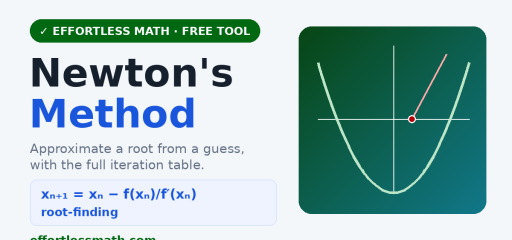
Use this free Newton’s method calculator to approximate a root of a function from a starting guess. It shows every iteration, the converged root, and a graph.
How Newton’s method works
Each step follows the tangent line to a better estimate: xₙ₊₁ = xₙ − f(xₙ)/f′(xₙ). It converges quickly when the guess is near a root.
How to use it
- Enter f(x), a starting value, and the number of iterations.
- Press Run iterations.
Related: the Equation Solver and the Derivative Calculator.
Frequently asked questions
What is Newton’s method?
Newton’s method is a way to approximate a root of a function, the x-value where f(x) = 0. You start with a guess, follow the tangent line at that point down to the x-axis, and use that crossing as a new guess. Repeating this usually homes in on the root very quickly when the starting guess is close.
What is the Newton-Raphson method formula?
The formula is xₙ₊₁ = xₙ − f(xₙ)/f′(xₙ). To approximate √2, use f(x) = x² − 2, so f′(x) = 2x. Starting at x₀ = 1 gives x₁ = 1 − (−1)/2 = 1.5, then x₂ = 1.5 − 0.25/3 ≈ 1.4167, already very close to √2 ≈ 1.4142.
How do you do Newton’s method on a calculator?
On a TI-84, store your guess, for example 1 → X. Then type the update step and store it back in X, such as X − (X² − 2)/(2X) → X. Each press of ENTER runs one more iteration, and you stop when the value stops changing. This calculator does the same steps and lists them in a table.
How do you do Newton’s method without a calculator?
Work with fractions and keep only two or three steps. For f(x) = x² − 2 with x₀ = 1: x₁ = 1 − (−1)/2 = 3/2, then x₂ = 3/2 − (1/4)/3 = 3/2 − 1/12 = 17/12 ≈ 1.4167. Writing f(x), f′(x) and the update in a small table keeps the arithmetic organized.
Is Newton’s method on the Calc AB or BC exam?
Newton’s method is not included in the current AP Calculus AB or BC course framework, though linear approximation with tangent lines is, and that is the same idea behind each Newton step. Some teachers still cover it, and it is common in college Calculus 1. Check the College Board course description for the latest topic list.
Is Newton’s method useful?
Yes. Newton’s method is one of the fastest ways to solve equations that have no simple algebraic solution, such as x³ + x − 1 = 0. Variations of it are used in computer software for square roots, engineering design, physics models and optimization. Its main weakness is that a poor starting guess or a zero derivative can make it fail.
How to use the Newton’s Method Calculator for homework
The Newton’s Method Calculator is most useful when you treat it as a learning check, not just a shortcut to the final answer. Start by copying the original problem carefully, including signs, exponents, decimal points, fractions, parentheses, and units. Then enter the values in the same order the problem gives them. A small typing change can completely change the result, especially in algebra, statistics, geometry, and probability problems.
Before you press the button to calculate, make a quick estimate or prediction. The estimate does not need to be exact. Its job is to help you notice impossible answers. If a distance becomes negative, a probability is bigger than 1, an angle looks too large, or a decimal point seems misplaced, go back and check the input before trusting the final result.
Before you enter the problem
- Rewrite the problem in a clean line so every value is easy to see.
- Use parentheses around grouped expressions, especially in fractions and exponents.
- Keep units with the numbers while you work, even if the calculator only asks for the numbers.
- Check whether the problem wants an exact value, a decimal approximation, or a rounded answer.
- Look for restrictions such as positive values only, a chosen interval, or a required domain.
How to read the result
After the calculator gives a result, read more than the final line. If steps, tables, graphs, or intermediate values are shown, use them to understand how the answer was built. That is especially important when you are studying for a quiz or test, because teachers often give more credit for a correct process than for an unsupported number.
Try to identify the main idea behind the result. For example, ask yourself which formula was used, which operation changed the expression, which value controlled the graph, or which assumption made the answer possible. When you can explain that idea in your own words, the tool has helped you learn the skill instead of only checking one problem.
Common mistakes to avoid
| Mistake | How to catch it |
|---|---|
| Typing the wrong sign | Compare each negative sign, subtraction symbol, and exponent with the original problem. |
| Rounding too early | Keep extra decimal places until the final step, then round only as directed. |
| Forgetting parentheses | Group numerators, denominators, powers, and multi-step expressions before calculating. |
| Ignoring units | Write the unit next to the final answer so the result has meaning. |
| Trusting an unreasonable result | Use estimation, a graph, or substitution to check whether the answer makes sense. |
Turn the answer into practice
One good way to study is to solve the problem by hand first, then use the Newton’s Method Calculator to check your work. If your answer is wrong, do not erase everything immediately. Find the first line where your work stops matching the calculator’s logic. That line is usually where the real misunderstanding happened.
- Work the problem on paper and circle your final answer.
- Use the calculator to check the result.
- If the answers match, write one sentence explaining the method.
- If they do not match, compare each step until you find the first difference.
- Redo a similar problem without the tool to make sure the correction sticks.
When to use a calculator and when to work by hand
Use the Newton’s Method Calculator when you want to check a long calculation, explore a pattern, test a graph, or confirm a result after practicing. Work by hand when the assignment asks for steps, when you are learning a new method, or when the test will not allow a digital tool. The strongest students use both: hand work to build understanding and calculators to check accuracy.
If you are preparing for a timed test, practice some problems without the tool and some with it. That balance helps you build speed while still understanding the math. Over time, the goal is to need the calculator less often for routine steps and use it more strategically for checking, exploring, and confirming your reasoning.
Quick accuracy checklist
Before you leave the page, use the Newton’s Method Calculator result to answer three quick questions: What was the input? What rule, formula, or method connects the input to the result? What would change if one number in the problem changed? These questions turn a single calculator answer into a reusable math skill.
For homework, write the original problem, the calculator’s result, and one short explanation of the method in your notebook. For test review, cover the result and try to reproduce the setup on your own. If you can set up a similar problem without looking back at the calculator, you are much closer to owning the skill.

Related to This Article
More math articles
- Fourth Amendment
- Unlocking the Secrets of Curves: Higher Order Derivatives in Graph Analysis
- Pocketbook and sociotropic economic voting
- Capitalization Rules
- Mastering the Midpoint & Distance on the Number Line
- Advanced Vocabulary Words: Chasm to Concoct
- Sex, Gender, and Sexuality
- 10 Most Common SSAT Upper-Level Math Questions
- Unanimous consent
- Groups, Networks, and Organizations




















What people say about "Newton's Method Calculator With Iteration Table"?
No one replied yet.