Online Math Tutoring Tools: The Top 5 tools
Heads up: some of the links below are affiliate links, so we may earn a small commission if you buy through them. It never costs you anything extra.
The right tools make online math tutoring feel almost like sitting side by side with a student. From writing equations by hand to showing your work and sounding crystal clear, here are the top 5 online math tutoring tools for 2026, everything you need to run engaging, professional sessions.
At a glance
| Product | Best for | Type | Price | |
|---|---|---|---|---|
| Wacom Intuos Pen Tablet | Writing math by hand | Pen tablet | \[ | Check price → |
| IPEVO V4K Document Camera | Demonstrating problems | Document camera | \] | Check price → |
| Anker PowerConf C200 (2K) | Sharp 2K video | Webcam | \[ | Check price → |
| Blue Yeti USB Microphone | Studio-quality audio | USB microphone | \] | Check price → |
| UBeesize 10″ Ring Light | Flattering lighting | Ring light | $ | Check price → |
1. Wacom Intuos Pen Tablet – Writing math by hand
A pen tablet is the single biggest upgrade for teaching math online, you write equations and draw diagrams by hand and they appear on screen, just like a whiteboard. The Wacom Intuos is accurate, reliable, and connects by USB or Bluetooth.

What’s good:
- Write math naturally on screen
- Accurate, battery-free pen
- USB or Bluetooth
- Shortcut keys
Worth knowing:
- Takes a day to get used to
2. IPEVO V4K Document Camera – Demonstrating problems
A document camera lets you point at a worksheet, textbook, or manipulative and show it live to your students. The IPEVO V4K is the teacher favorite, sharp 8MP, plug-and-play USB, and a flexible stand.

What’s good:
- Sharp 8MP image
- Plug-and-play USB
- Flexible jointed arm
- Great for modeling problems
Worth knowing:
- Needs a computer
3. Anker PowerConf C200 (2K) – Sharp 2K video
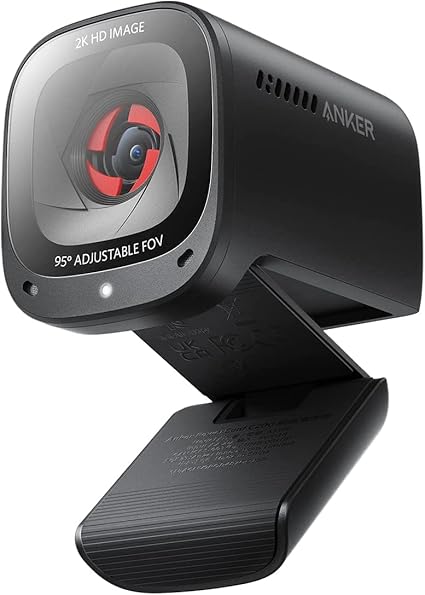
The Anker C200 steps up to 2K with AI auto-framing that keeps you centered as you move, plus noise-cancelling mics and a privacy cover. A polished pick for teachers who want to look their best.
What’s good:
- Sharp 2K resolution
- AI auto-framing
- Noise-cancelling mics
- Privacy cover
Worth knowing:
- Pricier than 1080p cams
4. Blue Yeti USB Microphone – Studio-quality audio
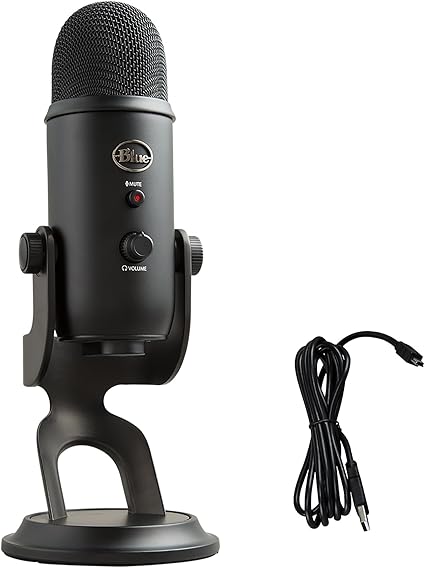
If you’d rather not wear a headset, a desk mic gives you warm, natural sound. The Blue Yeti is the most-recommended USB mic for teaching, with multiple pickup patterns and simple onboard controls.
What’s good:
- Warm, professional sound
- Multiple pickup patterns
- Onboard controls
- No headset to wear
Worth knowing:
- Picks up room noise if untuned
5. UBeesize 10″ Ring Light – Flattering lighting
Good lighting makes a bigger difference on camera than almost anything. This best-selling 10-inch ring light with a tripod stand brightens your face evenly, with adjustable color and brightness for any room.

What’s good:
- Even, flattering light
- Adjustable color and brightness
- Includes tripod and phone mount
- Affordable
Worth knowing:
- Takes some desk space
Building your online teaching setup
The biggest wins for teaching math online are a pen tablet (so you can write equations by hand), a document camera or webcam (so students can see you and your work clearly), and good audio (a headset or desk mic). Add a ring light to look your best on camera, and you have a setup that rivals an in-person classroom.
Our top 5 tools: a Wacom pen tablet for writing math, an IPEVO document camera for demonstrations, the Anker C200 for sharp 2K video, a Blue Yeti for studio-quality audio, and a ring light to look polished. Together they make your sessions clear, engaging, and professional.
Frequently asked questions
What are the best tools for online math tutoring?
A pen tablet for writing equations, a document camera for demonstrating problems, a good webcam (like the Anker C200 2K), a quality microphone such as the Blue Yeti, and a ring light. This combination covers writing, showing, seeing, and hearing.
Is a pen tablet better than a document camera?
For writing math digitally, yes, a pen tablet lets you write directly on the screen and save or share your notes. A document camera is better for showing physical worksheets, manipulatives, or a printed textbook.
How can I improve my audio for online tutoring?
Use a dedicated mic or headset instead of your laptop’s built-in mic. A USB desk mic like the Blue Yeti gives warm, clear sound; a headset like the Logitech H390 keeps audio private and noise-free.

Related to This Article
More math articles
- 5 Best Accuplacer Math Study Guides
- Settlement Houses, the Social Gospel, and Commercial Mass Culture
- Higher Education, Debt, and Unequal Returns
- Free Alabama Grade 2 English Worksheets
- How to Find Fractions of Time Units
- South Carolina EOC Algebra 1 Free Worksheets: 60 Free Printable EOC-Ready Algebra 1 Worksheets with Keys
- Parallel Sides in Quadrilaterals for 4th Grade
- What Kind of Math Is on the Accuplacer Next-Generation Test?
- Sharecropping, the Crop-Lien System, Convict Leasing, and the New South
- Collective Behavior, Social Movements, and Social Change












What people say about "Online Math Tutoring Tools: The Top 5"?
No one replied yet.