4 Perfect Tablets for Note-Taking in 2027

Heads up: some of the links below are affiliate links, so we may earn a small commission if you buy through them. It never costs you anything extra.
You don’t need a dozen options to find a great note-taking tablet, just the right four. We narrowed the field to the tablets that genuinely shine in 2026, one clear pick for each kind of note-taker: the all-rounder, the budget choice, the reader’s favorite, and the purist’s paper replacement. Here are four perfect tablets for note-taking.
At a glance
| Tablet | Best for | Screen | Stylus | Battery | |
|---|---|---|---|---|---|
| Apple iPad (11-inch, A16) | Best overall | 11″ Liquid Retina | Apple Pencil | ~10 hrs | Check price → |
| Samsung Galaxy Tab S6 Lite | Best value | 10.4″ LCD | S Pen (included) | ~13 hrs | Check price → |
| Amazon Kindle Scribe | Best for reading | 10.2″ E Ink | Pen (included) | Weeks | Check price → |
| reMarkable 2 | Best writing feel | 10.3″ E Ink | Marker Plus | ~2 weeks | Check price → |
1. Apple iPad (11-inch, A16) – Best overall
The standard iPad keeps earning the top spot because it does a bit of everything well. Pair it with an Apple Pencil and it becomes a fast, reliable notebook that also runs your apps, plays your lectures, and marks up PDFs. For the widest mix of features at a fair price, start here.

What’s good:
- Versatile, do-it-all tablet
- Smooth Apple Pencil writing
- Best selection of note apps
- Fair price for what it does
Worth knowing:
- Pencil costs extra
2. Samsung Galaxy Tab S6 Lite – Best value
Samsung’s Galaxy Tab S6 Lite is the budget hero, mostly because the S Pen comes in the box. You get a comfortable screen, expandable storage, and battery that lasts through a full day of note-taking, without spending iPad money.

What’s good:
- S Pen included
- Expandable storage
- Long battery
- Easy on the wallet
Worth knowing:
- Not as fast as an iPad
3. Amazon Kindle Scribe – Best for reading
If your notes live alongside heavy reading, the Kindle Scribe is a joy. The E Ink screen is gentle on the eyes, you can annotate documents and keep notebooks, and the battery stretches for weeks rather than hours.

What’s good:
- Paper-like, glare-free display
- Annotate PDFs and write notebooks
- Weeks of battery
- Distraction-free
Worth knowing:
- Slower than LCD
- No color
4. reMarkable 2 – Best writing feel
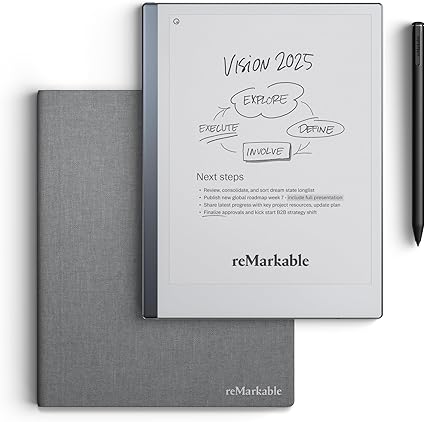
The reMarkable 2 strips everything back to pen and paper, and that’s the appeal. No apps, no alerts, just the best handwriting feel of any tablet here. For people who think clearest with a marker in hand, it’s worth every penny.
What’s good:
- Closest thing to real paper
- Zero distractions
- Thin and light
- Two-week battery
Worth knowing:
- Single-purpose
- No color
How we picked these four
We looked for a responsive stylus, a screen in the 10 to 11-inch range, solid handwriting apps or built-in note tools, and battery life that survives a real day. Each tablet here wins its niche: the iPad on versatility, the Galaxy Tab on value, and the two E Ink tablets on focus and eye comfort.
Four tablets, four clear winners. Grab the iPad if you want one device that does it all, the Galaxy Tab S6 Lite to save money, the Kindle Scribe if you read as much as you write, or the reMarkable 2 for the purest writing feel. Any of them will replace your notebook nicely.
Frequently asked questions
What is the best tablet for note-taking with a stylus?
The best tablet for note-taking with a stylus feels smooth to write on and runs good note apps. The Apple iPad (11-inch, A16) with an Apple Pencil is our overall pick because it also plays lectures and marks up PDFs. Keep in mind that the Pencil is sold separately, while the Samsung Galaxy Tab S6 Lite includes its S Pen.
Are tablets good for note-taking?
Yes, tablets are good for note-taking because handwritten notes, typed text, diagrams and PDFs can all live in one searchable place. They are especially handy for math, where you can sketch graphs and write equations by hand. The main downsides are cost and battery life, so pick a tablet whose battery covers your full school or work day.
What is the best e-ink tablet for note-taking?
E Ink tablets such as the reMarkable 2 and the Amazon Kindle Scribe are popular for note-taking because they feel close to paper and last weeks on a charge. The reMarkable 2 focuses on the writing experience, while the Kindle Scribe is a strong choice if you also read a lot of books. Neither shows color, and pages refresh more slowly.
What size tablet is best for note-taking?
A screen of about 10 to 11 inches is a comfortable size for most note-takers. It gives enough room to write a full line of an equation or sketch a diagram, yet still fits in a backpack. All four of our picks fall in that range, from the 10.2-inch Kindle Scribe to the 11-inch iPad.
What is the best budget tablet for note-taking?
The Samsung Galaxy Tab S6 Lite is a strong budget pick for note-taking because the S Pen comes in the box, so you do not need to buy a stylus separately. It has a 10.4-inch screen, expandable storage and battery for a full day of classes. It is slower than an iPad but handles everyday notes well.
How do you take notes on a tablet?
To take notes on a tablet, open a note app, choose a pen and paper style, and write with a stylus just as you would on paper. Organize notes into folders or notebooks by subject, and use the app’s search to find handwritten words later. For math class, a grid page template helps keep equations and graphs lined up.

Related to This Article
More math articles
- The Best Grade 6 ELA Practice Tests for Ohio Students
- How to Complete the Table of Division Two-Digit Numbers By One-digit Numbers
- Packaging Compatibility and Selection
- 6th Grade SC Ready Math Worksheets: FREE & Printable
- The Ultimate 7th Grade ILEARN Math Course (+FREE Worksheets)
- The Best Grade 8 Math Book for Mississippi Students
- Fighting words
- Top 10 Tips to Overcome ISEE Math Anxiety
- Ecosystems: Producers, Consumers, and Decomposers
- How to Using Decimals, Grid Models, and Fractions to Represent Percent










What people say about "4 Tablets for Note-Taking in 2026"?
No one replied yet.