Best Digital Writing Pads for Online Teaching in 2024

Heads up: some of the links below are affiliate links, so we may earn a small commission if you buy through them. It never costs you anything extra.
A digital writing pad is the secret weapon of a smooth online lesson, you write naturally with a pen, and your students see it appear on screen like magic. It beats dragging a mouse around every time you need to show working or sketch a diagram. Here are the best digital writing pads for online teaching in 2026, for every budget.
At a glance
| Tablet | Best for | Writing area | Connection | Shortcuts | |
|---|---|---|---|---|---|
| Wacom Intuos | Best overall | 8.5 x 5.3 in | USB + Bluetooth | 4 keys | Check price → |
| Huion Inspiroy 2 | Best value | 9 x 5 in | USB-C | 8 keys + wheel | Check price → |
| XP-Pen Deco MW | Best wireless | 8 x 5 in | USB + Bluetooth | 8 keys | Check price → |
| One by Wacom | Best budget | 8.5 x 5.3 in | USB (wired) | None | Check price → |
| Wacom Intuos Pro | Best premium | 8.7 x 5.8 in | USB + Bluetooth | Keys + ring | Check price → |
1. Wacom Intuos – Best overall
For online teaching, the Wacom Intuos is the writing pad most people should buy. The pen is precise, it connects by USB or Bluetooth, and the surface holds up to daily lessons. Four shortcut keys let you flip pages or undo without touching the keyboard.

What’s good:
- Precise, battery-free pen
- Wired or wireless
- Four shortcut keys
- Durable surface
Worth knowing:
- Dearer than budget pads
2. Huion Inspiroy 2 – Best value
The Huion Inspiroy 2 packs the most into a low price: a large writing area, eight buttons, and a scroll wheel for zooming mid-lesson. The pen feels paper-like, and it works with almost any computer.

What’s good:
- Scroll wheel and eight keys
- Large surface
- Paper-like pen
- Low price
Worth knowing:
- Cable connection on base model
3. XP-Pen Deco MW – Best wireless
The XP-Pen Deco MW cuts the cord with Bluetooth and an all-day battery, then adds eight customizable keys, all for less than the big brands. A neat, capable pad for a tidy desk.

What’s good:
- Wireless Bluetooth
- All-day battery
- Eight custom keys
- Affordable
Worth knowing:
- Smaller brand support
4. One by Wacom – Best budget
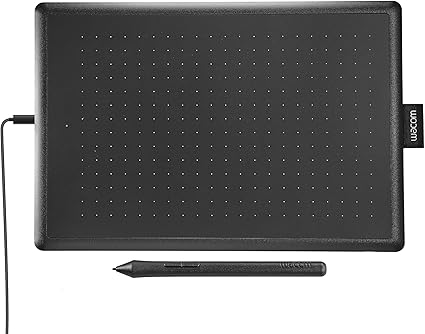
If you want to spend as little as possible, the One by Wacom is the writing pad to get. No buttons, no wireless, but a quality Wacom pen and Chromebook support, everything you strictly need to write lessons on screen.
What’s good:
- Quality pen, low price
- Chromebook-certified
- Light and simple
- Reliable
Worth knowing:
- No keys or wireless
5. Wacom Intuos Pro – Best premium
Full-time teachers who want the best writing feel should step up to the Wacom Intuos Pro. The pen and touch ring are a clear cut above, and the build is made for years of daily use.

What’s good:
- Best writing feel
- Touch ring for zoom
- Pro-grade build
- Wireless
Worth knowing:
- Priciest option
Choosing a writing pad
Pick a medium-sized surface so you have room to write equations, a battery-free pen for natural handwriting, and a connection that suits your desk, Bluetooth for fewer cables, or USB for simplicity. Shortcut keys are a bonus that save time once you set them up.
The Wacom Intuos is the best all-round writing pad for online teaching, with the Huion Inspiroy 2 close behind on value and the One by Wacom winning on price. Want the finest feel? The Intuos Pro delivers. Match one to your budget and you’ll wonder how you taught without it.
Frequently asked questions
What is a digital writing pad?
A digital writing pad (also called a pen or graphics tablet) is a flat pad you write on with a special pen. Your handwriting appears on your computer screen, which makes it ideal for showing math working or diagrams during online lessons.
Do I need a screen on the writing pad?
Not for teaching. Pads like the Wacom Intuos have no screen, you watch your computer monitor while you write, which keeps the cost down. Screen tablets cost much more and aren’t necessary for most online teachers.
Which writing pad is best for beginners?
The Wacom Intuos or the budget One by Wacom. Both are simple to set up, use a reliable pen, and work with Windows, Mac, and Chromebooks, so you can start teaching with them right away.

Related to This Article
More math articles
- How to Use Grid Models to Convert Fractions to Percentages?
- Presidential veto
- Top 10 Free Websites for ISEE Math Preparation
- Civil Rights and Supreme Court Decisions
- How to Solve the Converse of Pythagoras’ Theorem Problems?
- Active Reading Strategies
- How to Transform Quadratic Equations?
- Double Consciousness and Intersectionality
- The Ultimate HSPT Math Course (+FREE Worksheets & Tests)
- Converting Numbers Between Standard and Expanded Forms Up to a Billion









What people say about "Best Digital Writing Pads for Online Teaching"?
No one replied yet.