Best Digital Pen Tablet for Online Math Teaching in 2026

Heads up: some of the links below are affiliate links, so we may earn a small commission if you buy through them. It never costs you anything extra.
If you teach math online, a pen tablet is the closest thing to having a whiteboard at your desk. You write by hand and your students watch it appear on screen, far more natural than wrestling with a mouse. After years of recommending these, our favourite for most teachers is still the Wacom Intuos, but it isn’t the only one worth your money. Here’s the best digital pen tablet for online math teaching in 2026, with four strong alternatives for different budgets.
At a glance
| Tablet | Best for | Writing area | Connection | Shortcuts | |
|---|---|---|---|---|---|
| Wacom Intuos | Our top pick | 8.5 x 5.3 in | USB + Bluetooth | 4 keys | Check price → |
| Huion Inspiroy 2 | Best value alternative | 9 x 5 in | USB-C | 8 keys + wheel | Check price → |
| XP-Pen Deco MW | Best wireless | 8 x 5 in | USB + Bluetooth | 8 keys | Check price → |
| One by Wacom | Cheapest that still works | 8.5 x 5.3 in | USB (wired) | None | Check price → |
| Wacom Intuos Pro | Worth it for full-timers | 8.7 x 5.8 in | USB + Bluetooth | Keys + ring | Check price → |
1. Wacom Intuos – Our top pick
Our pick for most teachers is the Wacom Intuos, and it really comes down to trust. The pen lands exactly where you expect, the lines stay smooth even when you’re racing across a screen full of equations, and it works the first time you plug it in. Pair it over Bluetooth to keep the desk clear, and use the four buttons up top to flip pages or undo a stray mark. It’s the sweet spot of price and reliability.

What’s good:
- Pen you can trust to be accurate
- Bluetooth keeps the cable away
- Four handy shortcut buttons
- Tough enough for daily use
Worth knowing:
- A touch dearer than bargain tablets
2. Huion Inspiroy 2 – Best value alternative
Spend a bit less and the Huion Inspiroy 2 hands you more buttons and a scroll wheel that’s genuinely useful for zooming into a fiddly diagram. The writing area is roomy, the pen needs no batteries, and it plays nicely with Windows, Mac, and Android. This is the one for a teacher who wants maximum features without Wacom money.

What’s good:
- Scroll wheel for quick zooming
- Eight buttons, both-handed layout
- Large, comfortable surface
- Low price for what you get
Worth knowing:
- Connects by cable on the base model
3. XP-Pen Deco MW – Best wireless
Hate cables? The XP-Pen Deco MW runs on Bluetooth and lasts a full teaching day on one charge. The pen is responsive, eight buttons can be mapped to whatever you reach for most, and it costs clearly less than the big names. A tidy, capable middle-ground choice.

What’s good:
- Truly wireless over Bluetooth
- All-day battery
- Eight buttons to customise
- Friendly price
Worth knowing:
- Smaller community for help videos
4. One by Wacom – Cheapest that still works
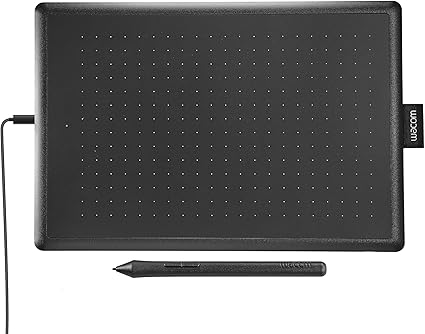
When the budget is tight, the One by Wacom is what I steer people toward. There are no buttons and no wireless, but the pen feel is the same Wacom quality, and it’s certified for the Chromebooks many schools hand out. For writing math on a screen, it covers the essentials and nothing you don’t need.
What’s good:
- Same quality Wacom pen
- Certified for Chromebooks
- Slim and light
- Very affordable
Worth knowing:
- No buttons
- Wired only
5. Wacom Intuos Pro – Worth it for full-timers
If teaching is your full-time job, the Wacom Intuos Pro is the upgrade to make. The pen feel beats every other tablet here, the touch ring makes zooming effortless, and the build is made to take years of daily wear. You pay more, but you notice the difference in every single lesson.

What’s good:
- Best writing feel on the list
- Touch ring for fast zoom
- Premium, long-lasting build
- Wireless ready
Worth knowing:
- The most expensive option
A quick word on buying
Before you pick one, think about three things: how much room you want to write in (medium suits most), whether you’d rather go wireless or never worry about charging, and how many shortcut buttons you’ll actually use. Match those to your teaching style and you’ll be happy with any tablet on this list.
For most online math teachers, the Wacom Intuos is the one to buy: reliable, comfortable, and fairly priced. Stretch the budget and the Intuos Pro is a real step up; tighten it and the One by Wacom still does the job. Whatever you choose, give yourself a day to get used to writing while looking at the screen instead of your hand, it clicks faster than you’d expect.

Related to This Article
More math articles
- The Best Grade 6 ELA Practice Tests for Mississippi Students
- The Challenge for The Future of Math Education
- Denotation and Connotation
- Words for Conflict and Cooperation
- Mitosis and Meiosis
- What are the Undefined Limits: Defining from Tables and Graphs
- Top 10 Free Websites for PERT Math Preparation
- Battle of the Decimals: Using Grids for Easy Comparisons
- How to Prepare for the CLEP College Algebra Test?
- Libel and slander



What people say about "Best Digital Pen Tablet for Online Math Teaching"?
No one replied yet.