Best Tablet For Math Note Taking
Heads up: some of the links below are affiliate links, so we may earn a small commission if you buy through them. It never costs you anything extra.
Typing math is a pain, you really want to write it by hand, and that’s exactly what a good note-taking tablet lets you do. Whether you’re solving equations, sketching graphs, or annotating a worksheet, the right tablet makes your notes neater and easier to study from later. Here are the best tablets for math note-taking in 2026, from the all-round iPad to distraction-free E Ink options.
At a glance
| Tablet | Best for | Screen | Stylus | Battery | |
|---|---|---|---|---|---|
| Apple iPad (11-inch, A16) | Best overall | 11″ Liquid Retina | Apple Pencil | ~10 hrs | Check price → |
| Apple iPad Air (M3) | Best if you want more power | 11″ Liquid Retina | Apple Pencil Pro | ~10 hrs | Check price → |
| Samsung Galaxy Tab S6 Lite | Best on Android | 10.4″ LCD | S Pen (included) | ~13 hrs | Check price → |
| Amazon Kindle Scribe | Best for focus | 10.2″ E Ink | Pen (included) | Weeks | Check price → |
| reMarkable 2 | Best pure writing feel | 10.3″ E Ink | Marker Plus | ~2 weeks | Check price → |
1. Apple iPad (11-inch, A16) – Best overall
For writing math by hand, the standard iPad with an Apple Pencil is the one to beat. Apps like Notability and GoodNotes turn your scribbled equations into tidy, searchable notes, and you can drag in a worksheet PDF and annotate right on top of it. The screen is fast and bright, so fractions and exponents stay crisp.

What’s good:
- Huge choice of handwriting apps
- Apple Pencil is accurate and lag-free
- Easy to mark up PDFs and worksheets
- Bright, fast screen
Worth knowing:
- Apple Pencil is sold separately
2. Apple iPad Air (M3) – Best if you want more power
The iPad Air does everything the regular iPad does, then adds the faster M3 chip and support for the Apple Pencil Pro, which adds a barrel roll and a squeeze shortcut that are genuinely handy when you’re switching between pen and eraser all class. Worth it if you’ll lean on the tablet heavily.

What’s good:
- Faster M3 chip for heavy use
- Apple Pencil Pro support
- Same great note apps
- Premium build
Worth knowing:
- Costs more than the base iPad
3. Samsung Galaxy Tab S6 Lite – Best on Android
If you’d rather not pay Apple prices, the Galaxy Tab S6 Lite includes its S Pen in the box, no extra purchase. Samsung Notes handles math jottings well, the screen is a comfortable size, and battery life is generous. It’s the value pick for handwritten notes.

What’s good:
- S Pen included, no extra cost
- Roomy screen, light body
- Long battery life
- Expandable storage
Worth knowing:
- Slower than an iPad
- Android note apps are fewer
4. Amazon Kindle Scribe – Best for focus
The Kindle Scribe swaps a glossy screen for paper-like E Ink, which is easier on the eyes for long study sessions. You can write in notebooks, mark up PDFs, and even convert handwriting to text, all with no apps or notifications to distract you. Battery lasts weeks.

What’s good:
- Paper-like, glare-free screen
- No notifications to distract you
- Weeks of battery
- Great for reading plus notes
Worth knowing:
- Slower than an LCD tablet
- Not built for color diagrams
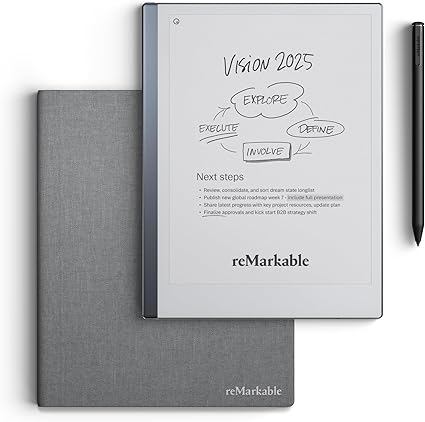
5. reMarkable 2 – Best pure writing feel
The reMarkable 2 is the closest thing to writing on real paper. There’s no app store and no browser, just notebooks, PDFs, and a marker that feels like pencil on a page. For a student who wants to think without distractions, nothing else comes close.
What’s good:
- Best paper-like writing feel
- Totally distraction-free
- Very thin and light
- Two-week battery
Worth knowing:
- No color
- Subscription for some cloud features
What matters for math notes
Look for a responsive stylus (handwriting that lags is frustrating with long equations), an app that converts or organizes your notes, and a screen size around 10 to 11 inches so you have room to work. E Ink tablets are easier on the eyes and last for weeks, but LCD tablets handle color graphs and switch apps faster.
For most students, the Apple iPad with a Pencil is the best all-round choice for math notes. Prefer Android and a stylus in the box? The Galaxy Tab S6 Lite saves you money. And if you want to focus without distractions, the reMarkable 2 or Kindle Scribe feel wonderful to write on. Pick the screen and budget that fit how you study.

Related to This Article
More math articles
- Model Magic: Visualizing Division with Two-digit Divisors
- The Best Grade 3 ELA Practice Tests for Iowa Students
- Intelligent Math Puzzle – Challenge 81
- 5th Grade NYSE Math Practice Test Questions
- 8th Grade SBAC Math Worksheets: FREE & Printable
- Party sorting, negative partisanship, and affective polarization
- Is There a Trick to Simplifying Radicals?
- Full-Length TABE 11 & 12 Math Practice Test-Answers and Explanations
- Standard, Formal English
- 8th Grade MEA Math Worksheets: FREE & Printable










What people say about "Best Tablet for Math Note-Taking"?
No one replied yet.