Top Tablets for Online Math Teaching

Heads up: some of the links below are affiliate links, so we may earn a small commission if you buy through them. It never costs you anything extra.
Teaching math over a video call goes a lot more smoothly when you can write your way through a problem instead of typing it. A pen tablet sits beside your keyboard and turns your handwriting into clean, on-screen notes your class can follow step by step. These are the tablets we’d put at the top of the list for online math teaching this year, with honest notes on who each one suits.
At a glance
| Tablet | Best for | Writing area | Connection | Shortcuts | |
|---|---|---|---|---|---|
| Huion Inspiroy 2 | Best value | 9 x 5 in | USB-C | 8 keys + wheel | Check price → |
| Wacom Intuos | Most reliable | 8.5 x 5.3 in | USB + Bluetooth | 4 keys | Check price → |
| XP-Pen Deco MW | Best wireless | 8 x 5 in | USB + Bluetooth | 8 keys | Check price → |
| One by Wacom | Simplest option | 8.5 x 5.3 in | USB (wired) | None | Check price → |
| Wacom Intuos Pro | Best pen feel | 8.7 x 5.8 in | USB + Bluetooth | Keys + ring | Check price → |
1. Huion Inspiroy 2 – Best value
Dollar for dollar, the Inspiroy 2 is hard to beat. The scroll wheel is the standout feature, flick it to resize your pen or zoom into a geometry figure without losing your train of thought. Eight programmable keys sit on each side, so it’s comfortable left- or right-handed, and the pen has a paper-like drag that makes handwriting look natural. It runs on Windows, Mac, and Android too.

What’s good:
- Scroll wheel is genuinely useful
- Comfortable for either hand
- Paper-like pen feel
- Plenty of tablet for the price
Worth knowing:
- No Bluetooth on the standard model
2. Wacom Intuos – Most reliable
When you just want gear that never argues with you, the Wacom Intuos delivers. It’s the tablet readers come back and thank us for: accurate pen, quick Bluetooth pairing, and a surface that shrugs off years of use. The four shortcut keys are a little thing that saves you constantly once they’re set up.

What’s good:
- Rock-solid reliability
- Pairs over Bluetooth fast
- Accurate, comfortable pen
- Four time-saving keys
Worth knowing:
- Priced a step above budget models
3. XP-Pen Deco MW – Best wireless
The Deco MW is the pick if cables make you twitch. It connects over Bluetooth, runs all day on a charge, and gives you a generous writing area plus eight buttons, all while undercutting Wacom and Huion on price. The pen handles pressure and tilt nicely, so strokes read like real ink.

What’s good:
- Wireless and long-lasting
- Generous writing area
- Eight custom buttons
- Undercuts the big brands
Worth knowing:
- Driver software is fairly basic
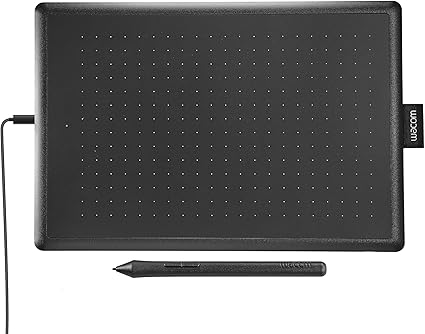
4. One by Wacom – Simplest option
Sometimes simple is the whole point. The One by Wacom has no buttons and no wireless, and that’s fine: you get a dependable pen and a slim tablet that just plugs in and works, including on school Chromebooks. It’s the no-fuss choice for teachers who’d rather not think about their hardware at all.
What’s good:
- Nothing to fuss over
- Reliable Wacom pen
- Chromebook-certified
- Easy on the budget
Worth knowing:
- No shortcut keys or wireless
5. Wacom Intuos Pro – Best pen feel
For teachers who basically live in their tablet, the Intuos Pro is the premium choice. Everything feels a notch more refined, the pen, the buttons, the touch ring you spin to zoom, and the build is made to last. It’s an investment, but a fair one if you’re on camera every day.

What’s good:
- The most refined writing feel
- Spin-to-zoom touch ring
- Built for heavy daily use
- Wireless when you want it
Worth knowing:
- Premium price
A quick word on buying
Before you pick one, think about three things: how much room you want to write in (medium suits most), whether you’d rather go wireless or never worry about charging, and how many shortcut buttons you’ll actually use. Match those to your teaching style and you’ll be happy with any tablet on this list.
If we had to name just one, the Huion Inspiroy 2 gives you the most for your money, while the Wacom Intuos is the safest all-round bet. Go wireless with the Deco MW, keep things simple with the One by Wacom, or treat yourself to the Intuos Pro, every one of them will make your lessons easier to follow.

Related to This Article
More math articles
- CLEP U.S. History I 093: Republican Party and the Collapse of the Whigs
- Necessary and Proper Clause
- Pluralism, Fundamentalism, and Religion in Public Life
- Billionaire Basics: How to Master Addition and Subtraction of Massive Whole Numbers
- The Ultimate MCA Algebra 1 Course (+FREE Worksheets)
- Top Proven Strategies To Increase Your SAT Math Score
- How AI Writing Tools Help Students Explain Math Solutions More Clearly
- Free Grade 3 English Worksheets for Florida Students
- The Ultimate 7th Grade Scantron Math Course (+FREE Worksheets)
- Media as a Social Institution












What people say about "Top Tablets for Online Math Teaching"?
No one replied yet.