Your Quick Guide to the Best Tablets for Teachers
Heads up: some of the links below are affiliate links, so we may earn a small commission if you buy through them. It never costs you anything extra.
Short on time? Here’s the quick version. The best tablet for a teacher depends on whether you’re presenting live, planning at your desk, or watching the budget. This guide cuts to the chase with a top pick for each situation, so you can choose in a couple of minutes and get back to your lesson plans.
At a glance
| Tablet | Best for | Screen | Stylus | Battery | |
|---|---|---|---|---|---|
| Apple iPad (11-inch, A16) | Best all-round classroom tablet | 11″ Liquid Retina | Apple Pencil | ~10 hrs | Check price → |
| Apple iPad Air (M3) | Best for heavy daily use | 11″ Liquid Retina | Apple Pencil Pro | ~10 hrs | Check price → |
| Samsung Galaxy Tab S6 Lite | Best budget option | 10.4″ LCD | S Pen (included) | ~13 hrs | Check price → |
| Amazon Kindle Scribe | Best for grading and prep | 10.2″ E Ink | Pen (included) | Weeks | Check price → |
| reMarkable 2 | Best for distraction-free planning | 10.3″ E Ink | Marker Plus | ~2 weeks | Check price → |
1. Apple iPad (11-inch, A16) – Best all-round classroom tablet
For most teachers, the iPad is the simplest yes. Mirror it to your projector or video call and your writing appears live, save each lesson to share, and tap into a deep library of teaching apps. It’s powerful, dependable, and easy to learn.

What’s good:
- Mirrors your writing to the class
- Save and share lessons
- Huge app library
- Easy to pick up
Worth knowing:
- Apple Pencil is an extra cost
2. Apple iPad Air (M3) – Best for heavy daily use
Teaching all day, every day? The iPad Air’s faster chip and Apple Pencil Pro keep up when you’ve got a call, a whiteboard, and a browser running at once. It costs more, but it stays smooth for years.

What’s good:
- Handles multitasking with ease
- Apple Pencil Pro shortcuts
- Built for daily use
- Large, bright screen
Worth knowing:
- More expensive
3. Samsung Galaxy Tab S6 Lite – Best budget option
The Galaxy Tab S6 Lite gives budget-minded teachers the essentials, an included S Pen, clean screen-sharing, and all-day battery, without the Apple price. A practical pick for the classroom.

What’s good:
- S Pen in the box
- Clean screen-sharing
- All-day battery
- Affordable
Worth knowing:
- Slower than an iPad
4. Amazon Kindle Scribe – Best for grading and prep
Away from the live lesson, the Kindle Scribe is a quiet workhorse for marking PDFs, planning, and writing without eye strain. Its E Ink screen makes long grading sessions far more comfortable.

What’s good:
- Gentle E Ink for long sessions
- Mark up student PDFs
- Converts notes to text
- Weeks of battery
Worth knowing:
- Not for live screen-sharing
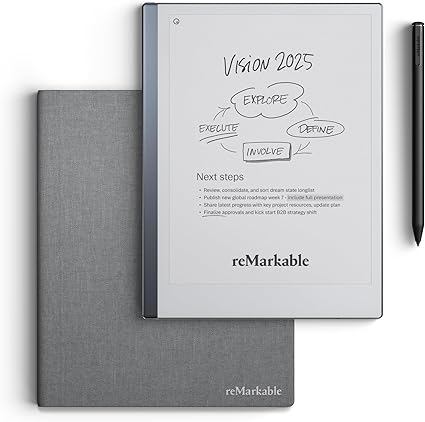
5. reMarkable 2 – Best for distraction-free planning
When you just need to think, the reMarkable 2 is pure focus, no notifications, just notebooks and a paper-like marker. Ideal for mapping out units and keeping tidy lesson notes that sync to your computer.
What’s good:
- No distractions at all
- Paper-like writing
- Syncs to your computer
- Very light
Worth knowing:
- Not a live-teaching tool
The 30-second buying guide
If you teach live, choose a tablet that screen-shares cleanly and exports lessons (iPad or Galaxy Tab). If it’s mostly for prep and grading, an E Ink tablet is kinder to your eyes and lasts weeks. Remember the stylus: the Galaxy Tab and E Ink tablets include one, the iPad does not.
In short: the iPad (or iPad Air for heavy users) is the best all-round teaching tablet, the Galaxy Tab S6 Lite is the budget choice, and the Kindle Scribe or reMarkable 2 are best for grading and planning. Pick the one that fits how you teach and you’re set.
Frequently asked questions
What is the best tablet for teachers overall?
For most teachers the Apple iPad is the best all-round choice. It mirrors your handwriting to a projector or video call, saves lessons you can share, and runs a huge range of teaching apps. If you teach full-time, the iPad Air adds speed worth the extra cost.
Can I use a tablet to teach on Zoom?
Yes. An iPad or Galaxy Tab can mirror its screen into Zoom so students see you write in real time, just like a whiteboard. E Ink tablets like the reMarkable are better for planning than live sharing.
Do these tablets come with a pen?
The Samsung Galaxy Tab S6 Lite, Kindle Scribe, and reMarkable 2 include a stylus. The iPad and iPad Air require buying an Apple Pencil separately.

Related to This Article
More math articles
- How to Master Probability Density Functions
- The Best Grade 6 ELA Practice Tests for Mississippi Students
- Constitutional Interpretations of Federalism
- SAT versus PSAT: What You Need to Know
- The Best Grade 3 ELA Practice Tests for Hawaii Students
- How to Graph Inverse of the Cosine Function?
- Free Printable Grade 2 English Worksheets for New Mexico
- Number Properties Puzzle -Critical Thinking 3
- Illinois IAR Grade 6 Math Free Worksheets: Printable Grade 6 Math Practice, Answers Included
- 5 Tips on How to Score Higher on SAT Math









What people say about "A Quick Guide to the Best Tablets for Teachers"?
No one replied yet.