Best Note-Taking Tablet for College Students
Heads up: some of the links below are affiliate links, so we may earn a small commission if you buy through them. It never costs you anything extra.
College means a firehose of lectures, readings, and problem sets, and a note-taking tablet helps you keep up without drowning in paper. The right one replaces your notebook, organizes everything, and often saves your back by replacing a stack of textbooks too. Here are the best note-taking tablets for college students in 2026, matched to different majors and budgets.
At a glance
| Tablet | Best for | Screen | Stylus | Battery | |
|---|---|---|---|---|---|
| Apple iPad (11-inch, A16) | Best all-rounder | 11″ Liquid Retina | Apple Pencil | ~10 hrs | Check price → |
| Samsung Galaxy Tab S6 Lite | Best value | 10.4″ LCD | S Pen (included) | ~13 hrs | Check price → |
| Amazon Kindle Scribe | Best for readings | 10.2″ E Ink | Pen (included) | Weeks | Check price → |
| Apple iPad Air (M3) | Best for demanding majors | 11″ Liquid Retina | Apple Pencil Pro | ~10 hrs | Check price → |
| reMarkable 2 | Best for focus | 10.3″ E Ink | Marker Plus | ~2 weeks | Check price → |
1. Apple iPad (11-inch, A16) – Best all-rounder
For most college students, the iPad hits the sweet spot. It takes handwritten lecture notes, marks up readings, runs your study apps, and doubles as the device you watch lectures on. With an Apple Pencil it’s a genuine paper replacement that also handles everything else student life throws at it.

What’s good:
- Does notes, readings, and everything else
- Excellent note apps
- Apple Pencil handwriting
- One device for the whole degree
Worth knowing:
- Pencil sold separately
2. Samsung Galaxy Tab S6 Lite – Best value
On a student budget, the Galaxy Tab S6 Lite is the smart buy, the S Pen is included, storage is expandable for years of lecture slides, and the battery gets you through back-to-back classes. You give up some speed, but you keep a lot of cash.

What’s good:
- Stylus included
- Expandable storage
- Long battery for long days
- Affordable
Worth knowing:
- Slower than an iPad
- Fewer top-tier apps
3. Amazon Kindle Scribe – Best for readings
Humanities and law students drowning in PDFs should look hard at the Kindle Scribe. The E Ink screen is easy on tired eyes, you can annotate readings and write notebooks, and a single charge lasts most of a term. It’s reading-first, with real note-taking built in.

What’s good:
- Easy on the eyes for heavy reading
- Annotate PDFs and write notes
- Battery lasts weeks
- Light to carry all day
Worth knowing:
- Slower page turns
- No color
4. Apple iPad Air (M3) – Best for demanding majors
Engineering, design, and CS students who’ll push a tablet hard should consider the iPad Air. The M3 chip handles heavier apps and multitasking, and the Apple Pencil Pro adds shortcuts that speed up note-heavy workflows. It costs more, but it won’t feel slow in two years.

What’s good:
- Fast enough for demanding apps
- Apple Pencil Pro support
- Great multitasking
- Future-proof
Worth knowing:
- Higher price
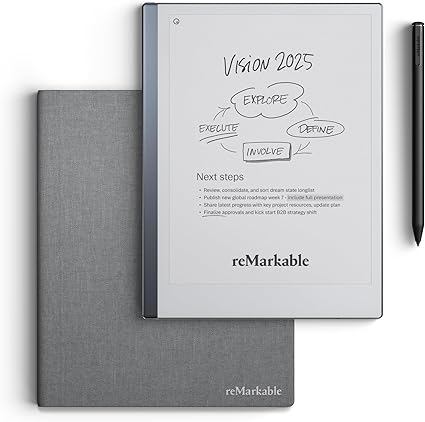
5. reMarkable 2 – Best for focus
If your phone and laptop are constant distractions, the reMarkable 2 is the antidote. It does one thing, handwritten notes and PDFs, with no apps or alerts to pull you away. Students who think best on paper love it for lectures and study.
What’s good:
- Completely distraction-free
- Paper-like note-taking
- Syncs to your devices
- Very portable
Worth knowing:
- Single-purpose
- No color or apps
How to choose for college
Think about your courses first. Reading-heavy majors benefit from an easy-on-the-eyes E Ink tablet, while STEM and design students want the speed and app support of an iPad. Check that your favorite note app (Notability, GoodNotes, OneNote, or Samsung Notes) runs on the tablet you’re eyeing, factor in the cost of a stylus if it isn’t included, and make sure the battery will survive a full day of classes.
The Apple iPad is the safest all-round pick for college, it handles notes, readings, and everything else. Watching your budget? The Galaxy Tab S6 Lite includes a stylus and costs far less. Buried in PDFs? The Kindle Scribe is easiest on your eyes. Choose based on your major and how hard you’ll push it.

Related to This Article
More math articles
- Patient-Care Equipment Basics
- Monopoly Demand and Marginal Revenue: Price and Profit
- How to Use Expanded Form to Multiply One-Digit Numbers By 3-digit or 4-digit Numbers
- How to Find Angles as Fractions of a Circle
- How to Calculate the Area, Perimeter, and Radius of Quarter Circles
- What Happens If You Don’t Pass the STAAR Test?
- The Ultimate 6th Grade CMAS Math Course (+FREE Worksheets)
- How to Plan and Save for College? (+FREE Worksheet!)
- 4th Grade SC Ready Math Worksheets: FREE & Printable
- Rules of Exponents











What people say about "Best Note-Taking Tablet for College Students"?
No one replied yet.