Equipment Needed for Online Math Teaching

Heads up: some of the links below are affiliate links, so we may earn a small commission if you buy through them. It never costs you anything extra.
Teaching math online well takes more than a laptop and good intentions, the right equipment makes your lessons clearer, smoother, and more professional. The good news is the essentials are affordable, and you don’t need everything at once. Here’s the equipment we recommend for online math teaching in 2026, from the computer that runs it all to the tools that let you write math on screen.
At a glance
| Equipment | What it is for | Type | |
|---|---|---|---|
| Lenovo IdeaPad Slim 5 Laptop | The computer | Laptop | Check price → |
| Dell 24″ Touchscreen Monitor (P2424HT) | Writing math on screen | Touchscreen monitor | Check price → |
| Wacom One 13 Pen Display | Precise handwriting | Pen display | Check price → |
| IPEVO V4K Document Camera | Showing work on paper | Document camera | Check price → |
| Logitech Brio 4K Webcam | Looking professional | Webcam | Check price → |
| Logitech H390 USB Headset | Clear two-way audio | Headset + mic | Check price → |
1. Lenovo IdeaPad Slim 5 Laptop – The computer
Everything starts with a reliable computer. The Lenovo IdeaPad Slim 5 has the 16GB of memory you need to run video calls, a browser full of tabs, and math software at once, plus a big screen and a great keyboard for long teaching days.

What’s good:
- 16GB RAM for multitasking
- Big 16″ screen
- Excellent keyboard
- Strong value
Worth knowing:
- A desktop is an alternative if you stay put
2. Dell 24″ Touchscreen Monitor (P2424HT) – Writing math on screen
To teach math online you need a way to write equations naturally. The Dell P2424HT folds nearly flat like a writing tablet, so you can annotate slides and work problems by hand while students watch in real time.
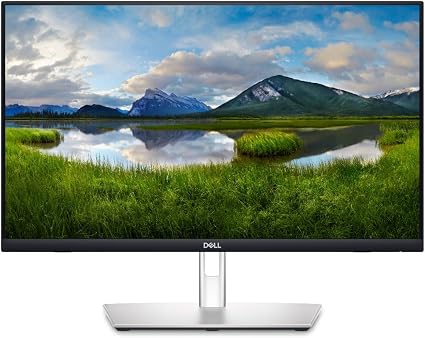
What’s good:
- Folds flat for handwriting
- 10-point touch
- USB-C single-cable hookup
- Doubles as a normal monitor
Worth knowing:
- Pair with a stylus for fine writing
3. Wacom One 13 Pen Display – Precise handwriting
If you want the most natural handwriting, a pen display is the tool. The Wacom One 13’s pressure-sensitive, battery-free pen makes writing equations feel like ink on paper, perfect for showing your working step by step.

What’s good:
- Natural, precise handwriting
- Battery-free pen
- Great for step-by-step math
Worth knowing:
- Needs a connected computer
4. IPEVO V4K Document Camera – Showing work on paper
Prefer pen and paper? A document camera points down at your desk so students see exactly what you write. The IPEVO V4K is the teacher standard, sharp 8MP and true USB plug-and-play.

What’s good:
- Shows handwritten work clearly
- Sharp 8MP
- Plug-and-play USB
- Affordable
Worth knowing:
- Needs decent lighting
5. Logitech Brio 4K Webcam – Looking professional
A dedicated webcam makes you look far sharper than a laptop camera. The Logitech Brio 4K delivers crisp video with auto light correction, so you stay clear even in a dimly lit room.

What’s good:
- Sharp 4K with HDR
- Auto light correction
- Reliable build
Worth knowing:
- A 1080p webcam is a cheaper alternative
6. Logitech H390 USB Headset – Clear two-way audio
Clear audio keeps students engaged, and a headset with a built-in mic is the simplest way to get it. The Logitech H390 plugs into USB, sits close to your mouth for clear voice, and costs very little, our top equipment-kit pick for sound.

What’s good:
- Clear noise-cancelling mic
- Plug-and-play USB
- Very affordable
- Comfortable
Worth knowing:
- Wired (a wireless headset is the alternative)
Building your online teaching setup
Start with the basics, a reliable computer, a webcam, and a headset, then add a way to write math: either a touchscreen monitor or pen display for writing on screen, or a document camera for working on paper. A wired internet connection and good lighting round out the setup. Buy in stages if you need to; even adding a proper headset and a way to handwrite equations transforms how clearly you can teach.
The core kit is a capable laptop, a webcam like the Logitech Brio, and a Logitech H390 headset for clear sound. To teach math specifically, add a way to handwrite equations, the fold-flat Dell touchscreen, the Wacom One pen display, or the IPEVO document camera. Together they make online math lessons feel almost as natural as the classroom.
Frequently asked questions
What tools do you need to teach math online?
You need a reliable computer, a webcam, a headset with a microphone and a steady internet connection. For math, add a way to write equations live: a touchscreen monitor, a pen display or a document camera. Free whiteboard and graphing apps round out the kit, letting you sketch number lines, graphs and step-by-step solutions while students watch.
How do you teach math online effectively?
Show your thinking in real time. Write each step by hand on a pen display or under a document camera instead of pasting finished slides, and pause often so students can try a problem themselves. Ask them to hold up or share their work, since seeing a student’s steps is the fastest way to catch a sign error or a skipped step.
What are the best practices for teaching math online?
Keep lessons short and interactive, check understanding every few minutes, and use clear audio so students never miss a step. Test your writing tool and camera before class, keep a backup plan if your connection drops, and record or share your handwritten notes afterward so students can review each worked example at their own pace.
How much does equipment for online math teaching cost?
It depends on what you already own. Many teachers start with their current laptop plus an inexpensive headset and webcam, then add a writing tool later, since a pen display or touchscreen monitor is usually the biggest single purchase. Buying in stages spreads out the cost, and you can check current prices before each upgrade.
What is the best math teaching equipment for showing handwritten work?
A document camera or a pen display works best. A document camera like the IPEVO V4K films paper, manipulatives and worksheets exactly as students would see them in class. A pen display or fold-flat touchscreen lets you write directly on slides. Teachers who use both can switch between digital annotation and real paper during the same lesson.

Related to This Article
More math articles
- Rational-choice voting
- Political speech
- 7th Grade GMAS Math Worksheets: FREE & Printable
- Fiscal federalism
- Geometric perspective: A Deep Dive into Polar Coordinates
- Free Grade 8 English Worksheets for Louisiana Students
- Wage Labor, Class and Early Unions: Hunt, Lowell and Collective Action
- Scarcity, Opportunity Cost, and the Production Possibilities Frontier
- Double Digits, Double Fun: How to Solve Word Problems with Two-digit Divisors
- How to Use Input/output Tables to Add and Subtract Integers?












What people say about "Equipment Needed for Online Math Teaching"?
No one replied yet.