5 Best Touchscreen Monitors for Teaching Online
Heads up: some of the links below are affiliate links, so we may earn a small commission if you buy through them. It never costs you anything extra.
A touchscreen monitor is one of the best upgrades for teaching math online. Being able to write equations and annotate slides directly on the screen, instead of wrestling with a mouse, makes lessons clearer and far more natural. Here are the five best touchscreen monitors for online teaching in 2026, from a fold-flat all-rounder to a portable travel pick.
At a glance
| Monitor | Best for | Type | |
|---|---|---|---|
| Dell 24″ Touch Monitor (P2424HT) | Best all-around | 23.8″ FHD touch | Check price → |
| InnoView 15.6″ Portable Touchscreen Monitor | Best portable | 15.6″ portable | Check price → |
| CUNPU 27″ Touchscreen Monitor | Best large desktop | 27″ FHD touch | Check price → |
| ASUS VT229H 21.5″ Touch Monitor | Best budget | 21.5″ FHD touch | Check price → |
| LG Smart Monitor Swing 32″ 4K Touch | Premium pick | 32″ 4K touch | Check price → |
1. Dell 24″ Touch Monitor (P2424HT) – Best all-around
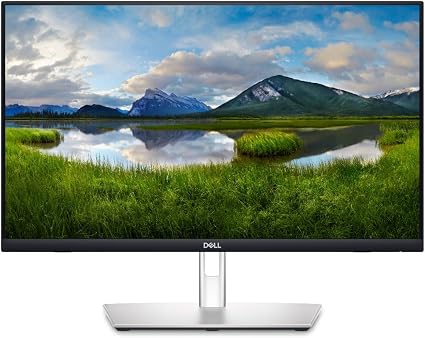
The Dell P2424HT is the touchscreen most teachers should buy first. Its 23.8-inch full-HD panel folds nearly flat like a drafting table, so you can write equations naturally, and a built-in USB-C hub powers your laptop and the display over one cable.
What’s good:
- Folds flat for writing math
- 10-point touch
- USB-C hub, single-cable setup
- Reliable Dell build
Worth knowing:
- Full HD, not 4K
2. InnoView 15.6″ Portable Touchscreen Monitor – Best portable
The InnoView 15.6-inch portable touchscreen folds into a backpack and runs off a single USB-C cable, so you can teach from anywhere. Despite the slim build, the 1080p panel is bright and the 10-point touch is responsive.

What’s good:
- Light and travel-ready
- Single USB-C cable
- Built-in stand and sleeve
- Affordable
Worth knowing:
- Smaller 15.6″ screen
3. CUNPU 27″ Touchscreen Monitor – Best large desktop
The CUNPU 27-inch gives you room to spread out: full-HD IPS, 100% sRGB color, and a roomy 10-point touch surface for annotating slides and spreadsheets. A VESA mount option keeps your desk flexible.

What’s good:
- Big 27″ touch surface
- Accurate sRGB color
- VESA mountable
- Great for spreadsheets
Worth knowing:
- Touch is Windows-only
4. ASUS VT229H 21.5″ Touch Monitor – Best budget
The ASUS VT229H proves a teaching touchscreen need not be expensive. Its 21.5-inch IPS panel is easy on the eyes with flicker-free, blue-light filtering, and the 10-point touch is reliable and plug-and-play.

What’s good:
- Wallet-friendly
- Flicker-free eye care
- Reliable 10-point touch
- Plug-and-play
Worth knowing:
- 1080p and no stand recline
5. LG Smart Monitor Swing 32″ 4K Touch – Premium pick
The LG Smart Monitor Swing is the splurge: a 32-inch 4K touchscreen on a wheeled, height-adjustable stand that swings into portrait or low for writing. webOS even runs apps without a PC.

What’s good:
- Big 32″ 4K touch
- Rolling, fully adjustable stand
- Runs apps via webOS
- USB-C 65W charging
Worth knowing:
- Premium price
- Use USB-C for reliable touch
How to choose a touchscreen monitor for teaching
Look for at least 10-point touch and a screen that tilts or folds flat so you can write comfortably. A USB-C connection that carries video, touch, and power on one cable keeps your desk tidy. Size is a personal call: 24 inches suits most desks, 27 to 32 inches gives more room to annotate, and a portable 15-inch model is ideal if you teach on the go. Note that some Windows touch monitors don’t support touch on macOS.
For most online teachers, the fold-flat Dell P2424HT is the best all-around pick. Want more room? The CUNPU 27″ spreads out beautifully, while the LG 32″ 4K Swing is the premium showpiece. Teaching on the move? The InnoView portable packs into a bag, and the ASUS VT229H keeps things affordable.
Frequently asked questions
Do I need a touchscreen monitor to teach math online?
No, but it helps enormously. Writing equations directly on the screen with your finger or a stylus is far more natural than using a mouse, and it makes your explanations clearer for students.
Can I write on these monitors with a pen?
Most support finger touch and a basic stylus. For true pressure-sensitive handwriting, a pen display like the Wacom One is purpose-built, but a fold-flat touch monitor like the Dell P2424HT works well for everyday annotation.
Do touchscreen monitors work with a Mac?
Many touchscreen monitors only support touch on Windows. macOS doesn’t natively support touch input, so check the listing, or use a USB-C model and a stylus app if you’re on a Mac.

Related to This Article
More math articles
- Industry cost conditions determine the final price
- Mastering Algebra II in Virginia: A Complete Guide for Students and Parents
- Comparing and Ordering Fractions for 5th Grade: Unlike Denominators
- Reading Graphs, Maps, and Political Cartoons
- Tip, Tax & Discount Math: Mental Shortcuts That Save Money
- The Ultimate 7th Grade Scantron Math Course (+FREE Worksheets)
- New Deal coalition
- Multistep Chemistry Problems: Moles to Gas Volume
- How to Master the Basics: A Comprehensive Guide to Prime Numbers, Multiples, Divisors, and Divisibility
- Formal constitutional amendment process












What people say about "5 Best Touchscreen Monitors for Teaching Online"?
No one replied yet.