Top 5 Laptop Stands to Help You Teach Online

Heads up: some of the links below are affiliate links, so we may earn a small commission if you buy through them. It never costs you anything extra.
If you teach online, raising your laptop to eye level does wonders for your posture and your on-camera angle, no more looking down at your students. A good laptop stand fixes both. Here are the best laptop stands to help you teach online in 2026, from a rock-solid desk riser to a stand that lets you teach standing up.
At a glance
| Product | Best for | Type | Standout | Price | |
|---|---|---|---|---|---|
| Rain Design mStand | Best overall | Fixed riser | Solid aluminum, zero wobble | \[ | Check price → |
| Nulaxy C5 | Best for standing | Sit-to-stand | Telescoping, lifts to ~20″ | \] | Check price → |
| Roost V3 | Best portable | Folding | Ultralight, packs tiny | \[$ | Check price → |
| Twelve South Curve Flex | Best adjustable | Adjustable | Height and angle adjust | \] | Check price → |
| BoYata Laptop Stand | Best budget heavy-duty | Adjustable | Stiff hinges hold heavy gear | $ | Check price → |
1. Rain Design mStand – Best overall
The Rain Design mStand is the buy-it-for-life laptop stand. Carved from a single block of aluminum with no moving parts, it lifts your screen to a comfortable, neck-friendly height and never wobbles while you teach. A built-in cable slot keeps your desk tidy.

What’s good:
- Rock-solid, zero wobble
- Raises screen to eye level
- Premium aluminum build
- Built-in cable management
Worth knowing:
- Fixed height only
2. Nulaxy C5 – Best for standing
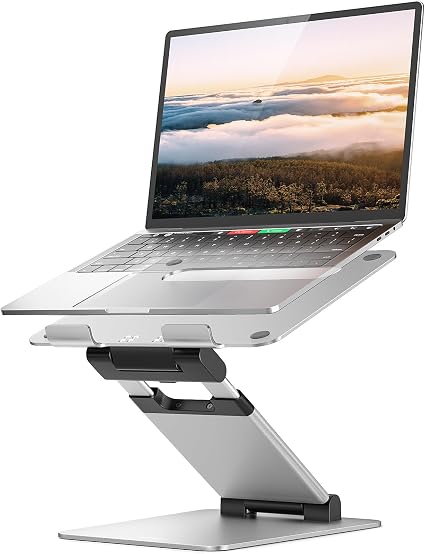
If you like to stand during lessons, the Nulaxy C5 is the one. Its telescoping arm rises from desk height all the way up to a standing position, supports heavy laptops, and folds away when you’re done. Great for switching posture through a long teaching day.
What’s good:
- Goes from sitting to standing
- Holds heavy laptops
- Wide height range
- Folds flat for storage
Worth knowing:
- Less rigid at full height
3. Roost V3 – Best portable
The Roost V3 weighs about six ounces and folds to the size of a marker, perfect if you teach from different rooms or travel. It springs open into a sturdy stand that lifts your laptop high, then disappears into your bag.

What’s good:
- Incredibly light and packable
- Lifts screen high
- Sturdy once set up
- Great for travel
Worth knowing:
- Pricey for its size
4. Twelve South Curve Flex – Best adjustable
The Curve Flex adjusts both height (2 to 11 inches) and angle, so you can dial in exactly the right position for your camera and posture. It folds flat with a travel pouch and handles laptops up to 17 inches.

What’s good:
- Adjustable height and angle
- Folds flat to travel
- Fits large laptops
- Elegant design
Worth knowing:
- Costs more than basic stands
5. BoYata Laptop Stand – Best budget heavy-duty
The BoYata stand pairs very stiff hinges with a low price, so it holds even heavy laptops at any angle without sagging. Multi-angle adjustment and a detachable design make it a flexible, affordable pick for your teaching desk.

What’s good:
- Holds heavy laptops without sag
- Multi-angle adjustment
- Affordable
- Detachable for travel
Worth knowing:
- Hinges are stiff to adjust at first
What to look for in a laptop stand
Aim for a stand that raises your screen close to eye level (better posture and a flattering camera angle), is stable enough not to wobble as you type, and fits your laptop’s size and weight. If you move around, prioritize a light, foldable model; if you like to stand, choose a sit-to-stand riser. A cable slot is a nice bonus.
For most teachers the Rain Design mStand is the best all-round laptop stand, sturdy, comfortable, and built to last. Want to stand while you teach? The Nulaxy C5 rises to standing height. Teach from different rooms? The featherweight Roost V3 travels anywhere. Pick the one that fits how you work.
Frequently asked questions
What is the best laptop stand for video calls?
The best laptop stand for video calls raises your camera to eye level and stays steady while you talk and type. The Rain Design mStand is our overall pick because its solid aluminum body does not wobble. If you like to stand while teaching, the Nulaxy C5 telescopes from desk height up to a standing position.
How do you use a laptop stand?
Place the stand on a stable desk, set your laptop on it, and adjust it so the top of the screen sits at or just below eye level. Then use a separate keyboard and mouse so your wrists stay comfortable. For online lessons, this keeps the webcam facing you straight on instead of looking up at your chin.
How do you set up a laptop stand?
Unfold or assemble the stand, choose the height and tilt, and check that the laptop’s rear vents are not blocked. Adjustable models such as the Twelve South Curve Flex let you set both height and angle. Sit in your usual teaching position and open your camera app to confirm the framing before your first call.
Can you make a laptop stand at home?
Yes, you can make a simple laptop stand at home from sturdy books, a cardboard box or a small wooden frame. Make sure it is stable, raises the screen to eye level and leaves room for air to flow under the laptop. A homemade stand works for occasional calls, while a metal stand is steadier for daily online teaching.
Is there a good laptop stand for video recording?
Yes, any stable stand that lifts your laptop to eye level works well for recording lessons, because it gives a natural camera angle and keeps the shot steady. A portable option like the Roost V3, which weighs about six ounces, suits teachers who record in different rooms. For desk recording, a rigid stand prevents shaking while you type.

Related to This Article
More math articles
- A Step into The World of Calculus: Rules of Differentiation
- Free Grade 5 English Worksheets for New Hampshire Students
- Common Science Question Traps
- The Best Grade 4 Math Book for Virginia Students
- The Best Algebra 1 Book for Texas Students
- North Dakota NDSA Grade 5 Math Prep, the Calm Way: 49 Free Single-Skill Worksheet PDFs
- How to Get a 36 on ACT Reading: 5 Strategies for the Enhanced ACT
- How to do the Decomposition of Fractions
- Gender Socialization and Social Structure
- Estimating Sums and Differences for 4th Grade










What people say about "Top 5 Laptop Stands for Teaching Online"?
No one replied yet.