The Best Webcams for Teachers and Online Students

Heads up: some of the links below are affiliate links, so we may earn a small commission if you buy through them. It never costs you anything extra.
Whether you’re a teacher running live classes or a student joining them, a dedicated webcam makes you clearer and easier to follow than a built-in camera ever could. Here are the best webcams for teachers and online students in 2026.
At a glance
| Webcam | Best for | Resolution | |
|---|---|---|---|
| Logitech C920x (1080p) | Best value | 1080p | Check price → |
| Logitech Brio 4K Webcam | Best overall | 4K HDR | Check price → |
| Logitech MX Brio 4K | Premium pick | 4K AI | Check price → |
| NexiGo N60 1080p Webcam | Best budget | 1080p budget | Check price → |
| Elgato Facecam MK.2 | Best for streaming quality | 1080p60 HDR | Check price → |
| Anker PowerConf C200 (2K) | Best for low light | 2K low-light | Check price → |
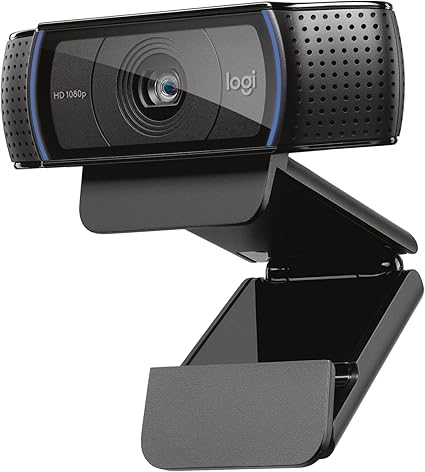
1. Logitech C920x (1080p) – Best value
The Logitech C920x is the dependable 1080p classic, clear video, decent dual mics, and true plug-and-play simplicity at a fair price. It’s the safe pick for most teachers.
What’s good:
- Reliable 1080p
- Dual mics
- Plug-and-play
- Affordable
Worth knowing:
- No 4K
2. Logitech Brio 4K Webcam – Best overall
The Logitech Brio 4K is the teacher’s go-to webcam, crisp 4K with HDR and auto light correction that keeps you looking sharp even in a dim room.

What’s good:
- Sharp 4K with HDR
- Auto light correction
- Reliable Logitech build
Worth knowing:
- Pricier than 1080p cams
3. Logitech MX Brio 4K – Premium pick
The Logitech MX Brio is the top-tier choice, 4K with AI-sharper image quality and a Show Mode that lets you tilt it to share notes or objects on camera.

What’s good:
- Top 4K image
- AI improvement
- Show Mode for demos
- USB-C
Worth knowing:
- Premium price
4. NexiGo N60 1080p Webcam – Best budget
The NexiGo N60 covers the basics, clear 1080p, a built-in privacy cover, and software controls, for the price of a couple of lunches. Ideal as a first webcam.

What’s good:
- Very affordable
- Privacy cover
- 1080p
- Software controls
Worth knowing:
- Basic low-light
5. Elgato Facecam MK.2 – Best for streaming quality
The Elgato Facecam MK.2 brings streaming-grade quality, HDR 1080p60 on a Sony sensor with DSLR-style manual controls, for teachers who want the most polished, smooth video.

What’s good:
- Smooth 1080p60
- HDR Sony sensor
- Manual controls
- Streaming-grade
Worth knowing:
- Setup software has a learning curve
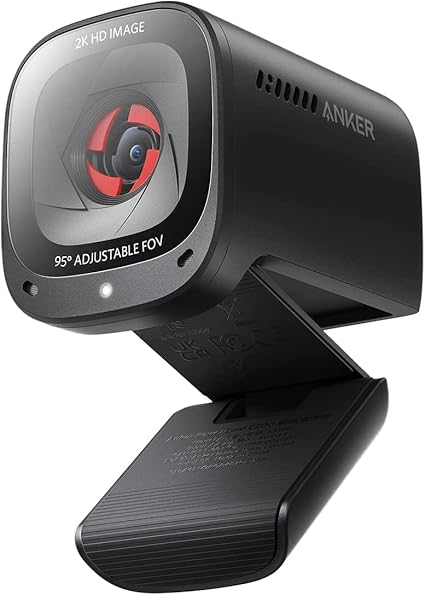
6. Anker PowerConf C200 (2K) – Best for low light
The Anker PowerConf C200 has dedicated low-light correction and a large aperture, so you stay bright and clear without buying a ring light. Its 2K sensor is a step above basic webcams.
What’s good:
- Great in dim rooms
- 2K resolution
- AI noise-canceling mics
- Affordable
Worth knowing:
- No 4K
Picking the right webcam
For most people a reliable 1080p webcam is plenty, clear, affordable, and plug-and-play. Step up to 2K or 4K if you want extra polish or plan to record. Check low-light handling and whether the built-in mic is good enough, or pair the camera with a headset. A privacy cover is a welcome bonus for students and teachers alike.
For most teachers and students, the Logitech C920x is the best value, with the Brio 4K and MX Brio stepping up the image quality. The NexiGo N60 is the budget choice, the Elgato Facecam MK.2 is the smoothest, and the Anker C200 is best for dim rooms.
Frequently asked questions
What is the best webcam for Zoom?
A good Zoom webcam gives clear 1080p or better video, handles uneven room lighting and connects without extra setup. For teachers running live classes, the Logitech Brio 4K is our overall pick because its HDR and auto light correction keep you sharp in a dim room. For most students joining class, the 1080p Logitech C920x is plenty.
What is the best webcam for Zoom meetings and online classes on a budget?
On a budget, a plug-and-play 1080p webcam is enough for Zoom meetings and online classes. The NexiGo N60 offers clear 1080p video and a built-in privacy cover, which is handy for students who share a computer at home. If you can spend a little more, the Logitech C920x adds dependable dual microphones for clearer audio.
What is the best webcam for Mac?
Most USB webcams work on a Mac without drivers, so choose based on image quality and your Mac’s ports. The Logitech MX Brio 4K connects over USB-C, which suits newer MacBooks, and its Show Mode lets you tilt the camera to show handwritten math work or notes on your desk. A 1080p model like the C920x also works well.
What is the best webcam for streaming?
For streaming or recording lessons, look for smooth frame rates and strong image controls. The Elgato Facecam MK.2 records 1080p at 60 frames per second with HDR, so motion such as writing on a whiteboard looks smooth. Teachers who record often should also add good lighting, since even the best webcam struggles in a dark room.
What is the best webcam for working from home?
A home-office webcam should look good in everyday room light and set up in seconds. The Anker PowerConf C200 (2K) is built for low light, which helps if you teach or tutor from a room with small windows. For long days of video calls and parent meetings, a reliable 1080p camera such as the Logitech C920x is a safe choice.

Related to This Article
More math articles
- How to Solve Literal Equations? (+FREE Worksheet!)
- Top 10 3rd Grade PSSA Math Practice Questions
- A floor binds above equilibrium
- The Ultimate 6th Grade NYSTP Math Course (+FREE Worksheets)
- Enhanced ACT Math 2026: The New 45-Question Section, Explained
- Unlocking the Mystery of Inscribed Angles: A Complete Guide
- First Amendment Freedom of the Press: Protections and Limits
- How to Find the Constant of Variation
- A Comprehensive Collection of Free ParaPro Math Practice Tests
- Opportunity Cost and Marginal Analysis: Make the Next Choice










What people say about "The Best Webcams for Teachers and Students"?
No one replied yet.