What Is The Best Calculator For Trigonometry?

Heads up: some of the links below are affiliate links, so we may earn a small commission if you buy through them. It never costs you anything extra.
Trigonometry leans on graphs, the unit circle, and a lot of sine, cosine, and tangent, so the right calculator makes the whole subject clearer. A graphing model is ideal here, though a strong scientific calculator covers the essentials. Here are the best calculators for trigonometry in 2026.
At a glance
| Calculator | Best for | Type | Screen | Approved | |
|---|---|---|---|---|---|
| TI-84 Plus CE | Best overall | Graphing | Color | SAT, PSAT, ACT, AP | Check price → |
| TI-Nspire CX II | Most powerful | Graphing | Color | SAT, PSAT, ACT, AP | Check price → |
| HP Prime | Best with CAS | Graphing (CAS) | Color touch | SAT, PSAT, AP, IB | Check price → |
| Casio fx-CG50 PRIZM | Best color for less | Graphing | Color | SAT, ACT, AP | Check price → |
| TI-30XS MultiView | Best budget scientific | Scientific | 4-line | SAT, ACT | Check price → |
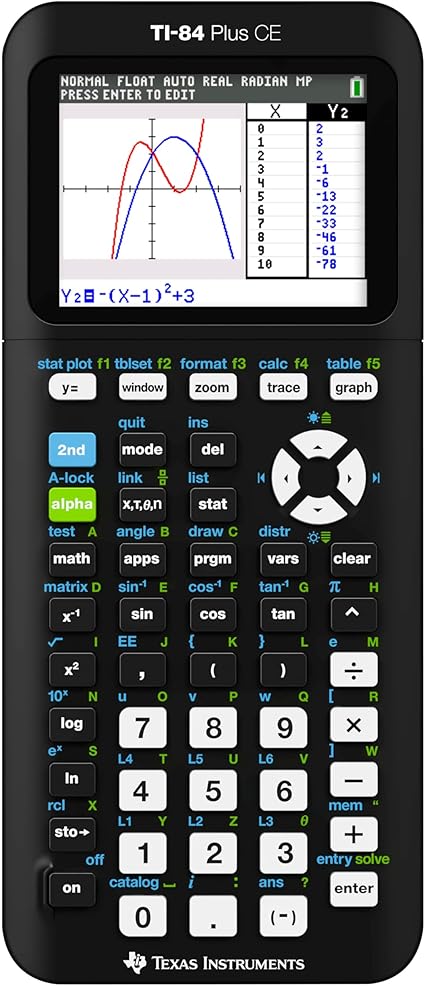
1. TI-84 Plus CE – Best overall
The TI-84 Plus CE is the calculator most students reach for first. It’s approved for the SAT, PSAT, ACT, and AP exams, the color screen makes graphs easy to read, and since it’s the model most classrooms use, your teacher can always help you with it. It’s thin, holds a charge for weeks, and handles algebra through calculus and statistics.
What’s good:
- Approved on the SAT, PSAT, ACT, and AP exams
- Clear color screen
- The model most classes already use
- Rechargeable battery
- Endless apps and tutorials
Worth knowing:
- One of the pricier picks
2. TI-Nspire CX II – Most powerful
If you want the most capable calculator that’s still test-legal, this is it. The TI-Nspire CX II does everything the TI-84 does and adds spreadsheets, Python, and the trick of showing a graph, your notes, and a data table on one screen. This is the non-CAS version, so it’s fine for the ACT too. A great choice for a future STEM major.

What’s good:
- Allowed on the SAT, PSAT, and ACT (non-CAS)
- Handles advanced math easily
- Python built in
- Bright, sharp screen
- Rechargeable battery
Worth knowing:
- Takes longer to learn than a TI-84
- Premium price
3. HP Prime – Best with CAS
The HP Prime is the power user’s pick. It has a full-color touchscreen you can pinch and swipe, a built-in computer algebra system, and serious programming tools, yet it’s slim and fast. Note the CAS means it isn’t allowed on the ACT, but it’s approved for the SAT, PSAT, and many AP and IB exams. If you love tinkering, it’s a joy to use.

What’s good:
- Color multi-touch screen
- Built-in CAS for symbolic math
- Strong programming (PPL and Python)
- Approved on SAT, PSAT, AP, and IB
- Rechargeable, very slim
Worth knowing:
- CAS means no ACT
- Different workflow if you grew up on TI
4. Casio fx-CG50 PRIZM – Best color for less
Casio’s fx-CG50 gives you a big color screen and even 3D graphing for noticeably less than the Texas Instruments models. It’s approved for the SAT, ACT, and AP exams, the menus are easy to navigate, and it shows fractions and roots the way they look in your textbook. A smart pick if you want graphing power without the TI price.

What’s good:
- Approved on the SAT, ACT, and AP exams
- Large color screen
- Can draw 3D graphs
- Cheaper than TI graphing models
- Textbook-style display
Worth knowing:
- Smaller user community
- Runs on AAA batteries
5. TI-30XS MultiView – Best budget scientific
The TI-30XS MultiView is the scientific calculator a huge number of classrooms standardize on. The four-line display shows fractions and exponents like your textbook, it runs on solar and battery, and it costs only a few dollars. It’s allowed on the SAT and ACT and it’s tough to wear out.

What’s good:
- Approved on the SAT and ACT
- Costs only a few dollars
- Four-line textbook display
- Solar and battery power
- Light and durable
Worth knowing:
- No graphing
- Not enough alone for higher math
How to choose
Always confirm the official calculator policy for your test first, then decide whether you need graphing or a scientific model, and pick one you can practice with ahead of time. A color screen and rechargeable battery are nice extras.
For trig, the TI-84 Plus CE is the best all-rounder, while the HP Prime and TI-Nspire CX II add power if you want it (just remember the HP Prime’s CAS isn’t allowed on the ACT). On a budget, the TI-30XS handles the basics.
Frequently asked questions
Do you need a calculator for trigonometry?
For most trigonometry courses, yes. You can find exact values like sin 30° = 1/2 or tan 45° = 1 by hand using special triangles and the unit circle, but angles such as 37° need a calculator. A scientific calculator covers sine, cosine, tangent and their inverses, while a graphing calculator also lets you see the shape of trig functions.
What mode should a calculator be in for trigonometry?
Use degree mode when angles are given in degrees and radian mode when they are in radians, such as π/6. Mixing them up is the most common trig calculator mistake: sin(30) gives 0.5 in degree mode but about −0.988 in radian mode. On TI calculators, press the mode key and choose DEG or RAD, and check the setting before every test.
How do you use a scientific calculator for trigonometry?
Check the angle mode first, then press the trig key followed by the angle. For example, in degree mode press sin, type 30, close the parenthesis and press enter to get 0.5. To find an angle from a ratio, use the inverse function: press 2nd then sin, enter 0.5, and the calculator returns 30°. Closing every parenthesis keeps the function applied to the right value.
What is a trigonometry calculator?
A trigonometry calculator is any calculator, handheld or online, that can evaluate sine, cosine and tangent and their inverses, and usually switch between degrees and radians. Most scientific calculators, including the TI-30XS MultiView, do this. Graphing models such as the TI-84 Plus CE can also plot functions like y = sin x, which helps you see amplitude, period and the repeating unit circle pattern.
What is the best calculator for trigonometry and calculus?
If you will move on to calculus, a graphing calculator is worth considering, because it can graph functions, find intersections and estimate derivatives numerically. The TI-84 Plus CE handles algebra through calculus and statistics and is approved for the SAT, PSAT, ACT and AP exams. CAS models like the HP Prime can solve equations symbolically, but CAS calculators are not allowed on the ACT.

Related to This Article
More math articles
- The Best Grade 7 ELA Practice Tests for Delaware Students
- 10 Most Common OAR Math Questions
- FREE ACT Math Practice Test
- House Rules Committee
- Verb Tenses, Forms, and Voice
- How to Solve Unknown Angles? (+FREE Worksheet!)
- Invention, Discovery, Diffusion, and Cultural Change
- Top Ten Cameras for Classroom Recording
- How to Get a PhD in Math
- 5th Grade PSSA Math Practice Test Questions








What people say about "What Is the Best Calculator for Trigonometry?"?
No one replied yet.