Heron’s Formula Calculator — Area from 3 Sides
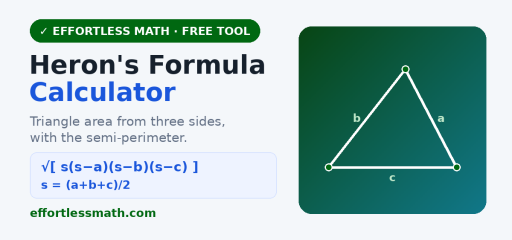
Use this free Heron’s formula calculator to find the area of a triangle from its three side lengths. It also reports the semi-perimeter, perimeter, a height, and the triangle type, with a scaled diagram.
Heron’s formula
With s = (a + b + c)/2, the area is √[ s(s − a)(s − b)(s − c) ]. The three sides must satisfy the triangle inequality.
How to use it
- Enter the three side lengths.
- Press Find area.
Related: the Triangle Calculator and the Law of Sines & Cosines Calculator.
Frequently asked questions
What is Heron’s formula?
Heron’s formula finds a triangle’s area using only its three side lengths. First compute the semi-perimeter s = (a + b + c)/2, then Area = √[s(s − a)(s − b)(s − c)]. For sides 5, 6 and 7, s = 9, so the area is √(9 × 4 × 3 × 2) = √216 ≈ 14.70 square units.
What does Heron’s formula calculate?
It calculates the area of any triangle when you know all three sides, with no height or angle needed. That makes it handy for scalene triangles where drawing an altitude is awkward. For a 3-4-5 right triangle, s = 6 and the area is √(6 × 3 × 2 × 1) = √36 = 6, which matches ½ × 3 × 4.
How do you simplify the square root in Heron’s formula?
Multiply the four factors under the radical, then pull out any perfect squares. For sides 7, 8 and 9, s = 12 and the product is 12 × 5 × 4 × 3 = 720. Since 720 = 144 × 5, the exact area is 12√5, or about 26.83 square units. Keep the radical form when your teacher asks for an exact answer.
Can Heron’s formula be used for a quadrilateral?
Not directly, because Heron’s formula is for triangles. You can split a quadrilateral along a diagonal into two triangles, apply Heron’s formula to each, and add the areas, as long as you know the diagonal’s length. For cyclic quadrilaterals, a related result called Brahmagupta’s formula, √[(s − a)(s − b)(s − c)(s − d)], works from the four sides alone.
How do you use Heron’s formula step by step?
Step 1: add the three sides and divide by 2 to get s. Step 2: subtract each side from s. Step 3: multiply s by those three differences. Step 4: take the square root. For an equilateral triangle with side 6, s = 9 and the area is √(9 × 3 × 3 × 3) = √243 ≈ 15.59. If any difference is zero or negative, the sides cannot form a triangle.
How to use the Heron’s Formula Calculator for homework
The Heron’s Formula Calculator is most useful when you treat it as a learning check, not just a shortcut to the final answer. Start by copying the original problem carefully, including signs, exponents, decimal points, fractions, parentheses, and units. Then enter the values in the same order the problem gives them. A small typing change can completely change the result, especially in algebra, statistics, geometry, and probability problems.
Before you press the button to calculate, make a quick estimate or prediction. The estimate does not need to be exact. Its job is to help you notice impossible answers. If a distance becomes negative, a probability is bigger than 1, an angle looks too large, or a decimal point seems misplaced, go back and check the input before trusting the final result.
Before you enter the problem
- Rewrite the problem in a clean line so every value is easy to see.
- Use parentheses around grouped expressions, especially in fractions and exponents.
- Keep units with the numbers while you work, even if the calculator only asks for the numbers.
- Check whether the problem wants an exact value, a decimal approximation, or a rounded answer.
- Look for restrictions such as positive values only, a chosen interval, or a required domain.
How to read the result
After the calculator gives a result, read more than the final line. If steps, tables, graphs, or intermediate values are shown, use them to understand how the answer was built. That is especially important when you are studying for a quiz or test, because teachers often give more credit for a correct process than for an unsupported number.
Try to identify the main idea behind the result. For example, ask yourself which formula was used, which operation changed the expression, which value controlled the graph, or which assumption made the answer possible. When you can explain that idea in your own words, the tool has helped you learn the skill instead of only checking one problem.
Common mistakes to avoid
| Mistake | How to catch it |
|---|---|
| Typing the wrong sign | Compare each negative sign, subtraction symbol, and exponent with the original problem. |
| Rounding too early | Keep extra decimal places until the final step, then round only as directed. |
| Forgetting parentheses | Group numerators, denominators, powers, and multi-step expressions before calculating. |
| Ignoring units | Write the unit next to the final answer so the result has meaning. |
| Trusting an unreasonable result | Use estimation, a graph, or substitution to check whether the answer makes sense. |
Turn the answer into practice
One good way to study is to solve the problem by hand first, then use the Heron’s Formula Calculator to check your work. If your answer is wrong, do not erase everything immediately. Find the first line where your work stops matching the calculator’s logic. That line is usually where the real misunderstanding happened.
- Work the problem on paper and circle your final answer.
- Use the calculator to check the result.
- If the answers match, write one sentence explaining the method.
- If they do not match, compare each step until you find the first difference.
- Redo a similar problem without the tool to make sure the correction sticks.
When to use a calculator and when to work by hand
Use the Heron’s Formula Calculator when you want to check a long calculation, explore a pattern, test a graph, or confirm a result after practicing. Work by hand when the assignment asks for steps, when you are learning a new method, or when the test will not allow a digital tool. The strongest students use both: hand work to build understanding and calculators to check accuracy.
If you are preparing for a timed test, practice some problems without the tool and some with it. That balance helps you build speed while still understanding the math. Over time, the goal is to need the calculator less often for routine steps and use it more strategically for checking, exploring, and confirming your reasoning.
Quick accuracy checklist
Before you leave the page, use the Heron’s Formula Calculator result to answer three quick questions: What was the input? What rule, formula, or method connects the input to the result? What would change if one number in the problem changed? These questions turn a single calculator answer into a reusable math skill.
For homework, write the original problem, the calculator’s result, and one short explanation of the method in your notebook. For test review, cover the result and try to reproduce the setup on your own. If you can set up a similar problem without looking back at the calculator, you are much closer to owning the skill.

Related to This Article
More math articles
- Full-Length GRE Math Practice Test
- Chapter 19: Freedom of Religion
- Full-Length 6th Grade PARCC Math Practice Test
- Spaulding Classification and Disinfectant Selection
- The Illinois IAR Grade 5 Math Worksheet Pack — 49 Free Printable Pages with Solutions
- Tracking, Hidden Curriculum, Credentials, and Unequal Signals
- Derivative Calculator — Differentiate Step by Step (Free)
- Free Grade 3 English Worksheets for Wyoming Students
- A Comprehensive Guide to the Properties of Rhombuses
- The Best Grade 5 Math Book for Colorado Students






What people say about "Heron's Formula Calculator: Area From 3 Sides"?
No one replied yet.