Best Computers for Graphic Design in 2026

Heads up: some of the links below are affiliate links, so we may earn a small commission if you buy through them. It never costs you anything extra.
Graphic design demands a screen that shows accurate color and a machine that does not choke on big files. Whether you work in Photoshop, Illustrator, or a full 3D suite, the right computer keeps your colors true and your workflow smooth. Here are the best computers for graphic design in 2026, from the industry-standard MacBook Pro to a color-accurate Windows alternative.
At a glance
| Laptop | Best for | CPU | RAM | Screen | |
|---|---|---|---|---|---|
| Apple MacBook Pro 14 (M4 Pro) | Best overall | M4 Pro | 24GB | 14.2″ XDR | Check price → |
| ASUS ProArt P16 | Best Windows | Ryzen AI 9 + RTX 5070 | 32GB | 16″ OLED | Check price → |
| Apple MacBook Air 13 (M4) | Best value Mac | Apple M4 | 16GB | 13.6″ Retina | Check price → |
| Asus Zenbook 14 OLED | Best portable Windows | Core Ultra 7 | 16GB | 14″ OLED | Check price → |
| Lenovo Yoga 9i 2-in-1 | Best 2-in-1 for sketching | Core Ultra 7 | 32GB | 14″ OLED | Check price → |
1. Apple MacBook Pro 14 (M4 Pro) – Best overall
The MacBook Pro 14 with the M4 Pro chip is the industry standard for design. Its mini-LED screen shows reference-grade color straight out of the box, it stays silent under heavy Photoshop and Illustrator work, and the battery lasts far longer than any rival.

What’s good:
- Reference-grade color out of the box
- Silent under heavy load
- Class-leading battery
- Powerful M4 Pro chip
Worth knowing:
- Expensive
2. ASUS ProArt P16 – Best Windows
The ASUS ProArt P16 is the Windows machine to match it, a Pantone-validated OLED, a discrete RTX 5070 GPU for 3D and rendering, and the ports creatives actually use. A genuine MacBook Pro alternative.

What’s good:
- Pantone-validated OLED
- Powerful RTX 5070 GPU
- Plenty of ports
- Strong for 3D and video
Worth knowing:
- Heavy
- Premium price
3. Apple MacBook Air 13 (M4) – Best value Mac
Not every designer needs a Pro. The MacBook Air M4 has the same accurate screen and handles photo editing and vector work beautifully, in a lighter, cheaper package, as long as you are not doing heavy 3D.

What’s good:
- Accurate screen
- Light and silent
- Great value for design
- All-day battery
Worth knowing:
- No discrete GPU
- Less headroom for 3D
4. Asus Zenbook 14 OLED – Best portable Windows
The Zenbook 14 OLED brings a color-rich OLED screen and solid performance in a slim, affordable body, ideal for designers who travel and work mostly in 2D.

What’s good:
- Color-rich OLED
- Light and portable
- Affordable
- Good battery
Worth knowing:
- No dedicated GPU
5. Lenovo Yoga 9i 2-in-1 – Best 2-in-1 for sketching
The Lenovo Yoga 9i folds into a tablet and ships with a pen, so you can sketch and retouch directly on its bright OLED screen. A flexible pick for illustrators.
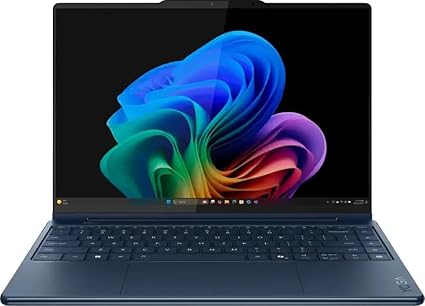
What’s good:
- Folds into a tablet
- Pen included
- Bright OLED screen
- 32GB RAM
Worth knowing:
- No discrete GPU
- Pricier than clamshells
What designers should prioritize
Color accuracy comes first, look for a factory-calibrated or Pantone-validated screen covering close to 100% of DCI-P3. Then weigh whether you need a discrete GPU (essential for 3D and heavy video, optional for 2D). Finally, get at least 16GB of RAM, 32GB for serious 3D, and plenty of fast SSD storage for big project files.
For most designers the MacBook Pro 14 (M4 Pro) is the gold standard, with the ASUS ProArt P16 the best Windows alternative for those who need an RTX GPU. Working mostly in 2D or on a budget? The MacBook Air M4 and Zenbook 14 OLED both have excellent screens. Illustrators should look at the pen-equipped Yoga 9i.
Frequently asked questions
What laptop is best for graphic design?
The MacBook Pro 14 with M4 Pro is the top pick, its factory-calibrated mini-LED screen and silent power make it the industry standard. For Windows, the ASUS ProArt P16 offers a Pantone-validated OLED and a discrete GPU.
Do I need a MacBook for design?
No. Macs are popular for their color accuracy and build, but Windows machines like the ASUS ProArt P16 match them and add a discrete GPU. Choose based on your software and budget.
How much RAM do I need for graphic design?
16GB is the minimum for comfortable photo and vector work. Step up to 32GB if you do heavy 3D, video, or work with very large files.

Related to This Article
More math articles
- 6th Grade SOL Math Worksheets: FREE & Printable
- Words for Character and Attitude
- 5 Algebra 1 Books: Choose the Right Study Guide
- Functionalist, Conflict, and Interactionist Views of Education
- Majority rule and minority rights
- How to Rationalize Radical Expressions? (+FREE Worksheet!)
- Free Grade 5 Math PDFs for Ohio OST: 49 Single-Skill Worksheets with Step-by-Step Keys
- Political knowledge
- Factor markets and policy compare private with social value
- Best Free Apps That Solve Math Problems for You











What people say about "Best Computers for Graphic Design in 2026"?
No one replied yet.