The 8 Best Webcams for Online Teachers

Heads up: some of the links below are affiliate links, so we may earn a small commission if you buy through them. It never costs you anything extra.
A good webcam instantly makes your online lessons look more professional, sharper video, better color, and clearer audio than any built-in laptop camera. Here are the best webcams for online teachers in 2026, across every budget.
At a glance
| Webcam | Best for | Resolution | |
|---|---|---|---|
| Logitech Brio 4K Webcam | Best overall | 4K HDR | Check price → |
| Logitech C920x (1080p) | Best value | 1080p | Check price → |
| NexiGo N60 1080p Webcam | Best budget | 1080p budget | Check price → |
| Logitech MX Brio 4K | Premium pick | 4K AI | Check price → |
| Anker PowerConf C200 (2K) | Best for low light | 2K low-light | Check price → |
| Elgato Facecam MK.2 | Best for streaming quality | 1080p60 HDR | Check price → |
1. Logitech Brio 4K Webcam – Best overall
The Logitech Brio 4K is the teacher’s go-to webcam, crisp 4K with HDR and auto light correction that keeps you looking sharp even in a dim room.

What’s good:
- Sharp 4K with HDR
- Auto light correction
- Reliable Logitech build
Worth knowing:
- Pricier than 1080p cams
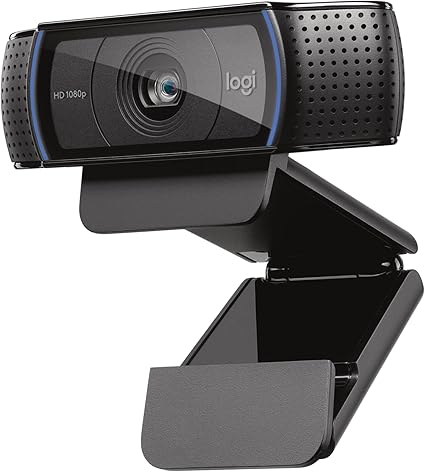
2. Logitech C920x (1080p) – Best value
The Logitech C920x is the dependable 1080p classic, clear video, decent dual mics, and true plug-and-play simplicity at a fair price. It’s the safe pick for most teachers.
What’s good:
- Reliable 1080p
- Dual mics
- Plug-and-play
- Affordable
Worth knowing:
- No 4K
3. NexiGo N60 1080p Webcam – Best budget
The NexiGo N60 covers the basics, clear 1080p, a built-in privacy cover, and software controls, for the price of a couple of lunches. Ideal as a first webcam.

What’s good:
- Very affordable
- Privacy cover
- 1080p
- Software controls
Worth knowing:
- Basic low-light
4. Logitech MX Brio 4K – Premium pick
The Logitech MX Brio is the top-tier choice, 4K with AI-stronger image quality and a Show Mode that lets you tilt it to share notes or objects on camera.

What’s good:
- Top 4K image
- AI improvement
- Show Mode for demos
- USB-C
Worth knowing:
- Premium price
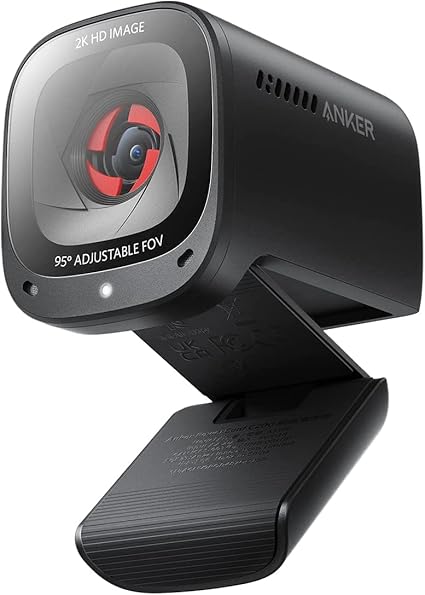
5. Anker PowerConf C200 (2K) – Best for low light
The Anker PowerConf C200 has dedicated low-light correction and a large aperture, so you stay bright and clear without buying a ring light. Its 2K sensor is a step above basic webcams.
What’s good:
- Great in dim rooms
- 2K resolution
- AI noise-canceling mics
- Affordable
Worth knowing:
- No 4K
6. Elgato Facecam MK.2 – Best for streaming quality
The Elgato Facecam MK.2 brings streaming-grade quality, HDR 1080p60 on a Sony sensor with DSLR-style manual controls, for teachers who want the most polished, smooth video.

What’s good:
- Smooth 1080p60
- HDR Sony sensor
- Manual controls
- Streaming-grade
Worth knowing:
- Setup software has a learning curve
How to choose a webcam for teaching
1080p is the practical minimum for clear video; 4K adds extra sharpness if you want it. Pay attention to low-light performance, since home lighting is rarely perfect, and look for a built-in mic or plan to use a separate one. Autofocus and a privacy cover are nice extras. Most teachers are well served by a reliable 1080p or 2K model.
The Logitech Brio 4K is the best overall webcam, while the C920x is the value favorite and the NexiGo N60 the budget pick. For more, the MX Brio is the premium 4K, the Anker C200 excels in low light, and the Elgato Facecam MK.2 gives the smoothest, streaming-grade video.
Frequently asked questions
What webcam resolution do I need for teaching?
1080p is the sweet spot, clear and widely affordable. 4K models like the Brio add extra sharpness, but 1080p looks great on most platforms and saves money.
Are external webcams better than laptop cameras?
Almost always, yes. Even a budget external webcam usually beats a built-in laptop camera on sharpness, color, and low-light performance, making you look noticeably more professional.
What’s the best webcam for a dark room?
The Anker PowerConf C200 stands out for low-light correction, keeping you bright and clear without extra lighting. A ring light also helps any webcam look its best.

Related to This Article
More math articles
- Area of a Trapezoid
- Decimal Dynamics: How to Master the Art of Adding and Subtracting Decimals
- Multiplying Decimals for 5th Grade: Rules and Examples
- ASWB Three-Option Questions: Use Evidence to Eliminate a Distractor (2027 Prep)
- Measurements – Time
- ISEE Upper Level Math Flashcards (Free Online: Formulas, Terms & Concepts)
- Algebra 1 Practice Test with Answers
- Line Segments
- 6th Grade English Worksheets for North Carolina (EOG): 46 Free Printable PDFs
- 5 Best HiSET Math Study Guides











What people say about "The 8 Best Webcams for Online Teachers"?
No one replied yet.