YOUR PSAT 8/9 STUDY COMPANION
PSAT 8/9 Calculators: Bluebook Options and 5 Handhelds
Heads up: some of the links below are affiliate links, so we may earn a small commission if you buy through them. It never costs you anything extra.

You can use the graphing or scientific Desmos calculator built into Bluebook for PSAT 8/9 Math, or bring an acceptable handheld. A separate graphing-calculator purchase is optional. Check College Board’s current calculator policy before choosing a device.
Heads up: some of the links below are affiliate links, so we may earn a small commission if you buy through them. It never costs you anything extra.
This guide compares five existing handheld options by type and classroom fit. It does not rank speed, promise a score, or establish which seller has the lowest current price.
Which calculators are allowed on PSAT 8/9?
College Board permits non-CAS graphing, scientific and basic four-function handheld calculators, subject to its restrictions. It no longer maintains a list of specifically permitted graphing models. Check the exact device and its installed software.
- CAS calculators and symbolic-algebra apps or programs are prohibited. TI-Nspire CX II CAS is different from the non-CAS CX II.
- Remove stored documents and programs with algebra functionality; turn off sound.
- Use a working battery-powered handheld, without a power cord. Do not share calculators.
- Use it only in Math, not Reading and Writing.
The SAT Suite policy is not automatically the same as AP or ACT policy. Check each test’s own rules.
Try Bluebook’s built-in calculator before buying
Bluebook offers both graphing and scientific calculator modes. Try the Math tools in its test preview and official practice before deciding whether an additional handheld would help you.
During practice, notice which workflow feels clearer: entering an expression, changing a graph window, checking a table, or evaluating a fraction. Choose by your ability to use the tool accurately, not by how many functions its packaging lists.
Five handheld calculators to compare
The retailer links are preserved below. Confirm the exact model, selected variant, seller, condition, current price and return terms before purchasing. The descriptions summarize manufacturer information, not hands-on comparative testing.
1. TI-84 Plus CE
TI describes a color-screen graphing calculator. Compare it if your class already uses the TI-84 family and you want to keep a familiar workflow. The CE and CE Python variants are different products; check the selected listing.
Read the TI-84 Plus CE manufacturer information
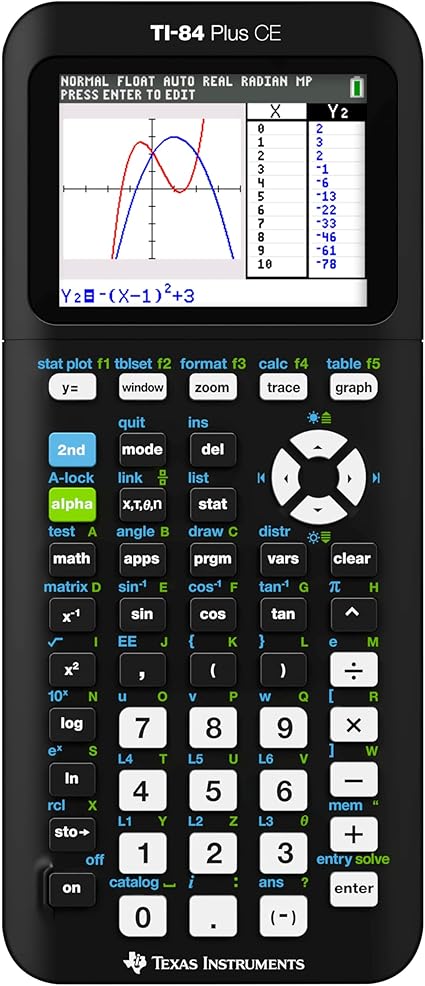
2. TI-Nspire CX II
TI offers both CX II and CX II CAS versions. For this test, the distinction matters: College Board prohibits the CAS model. The existing retailer link names the CX II graphing calculator; verify the exact selected variant before ordering.
Read the TI-Nspire CX II manufacturer information

3. Casio fx-CG50 PRIZM
Casio describes the fx-CG50 as a graphing scientific calculator with graph, equation and matrix tools. Compare its menus with the calculator you already know; extra features alone do not make it a better test-day choice.
Read the Casio fx-CG50 PRIZM manufacturer information

4. Casio fx-9750GIII
Casio identifies this model as a graphing calculator with Natural Textbook Display and programming support. Do not buy it on the assumption that it costs half as much as another model; compare current offers and your classroom needs.
Read the Casio fx-9750GIII manufacturer information

5. TI-30XS MultiView
TI identifies a four-line scientific calculator with fraction/decimal conversion and statistics. It does not provide a graphing window. Compare it if you prefer handheld arithmetic and will use Bluebook for graphing.
Read the TI-30XS MultiView manufacturer information

Practice the actions you will actually use
Before test day, enter fractions and grouped expressions, switch between a table and graph where available, and check whether you need degrees or radians. Estimate first so an input error is easier to spot. You do not need to use a calculator for every question.
For example, enter (18 + 12) ÷ 5 and check that the result is 6. Without parentheses, 18 + 12 ÷ 5 gives 20.4. This is an original input-check example, not an official PSAT question.
Show a short pretest equipment check
Confirm the exact model and current rules, review the required document/program cleanup, charge or replace batteries as appropriate, and practice the same workflow you plan to use. Ask your school about any approved accommodation or test-day instruction you do not understand.
Continue with PSAT 8/9 Math review
Open the PSAT 8/9 Math Hub for related lessons, formulas and study resources. Start PSAT 8/9 Math practice for the existing public practice starting point.

Related to This Article
More math articles
- Marginal is not average or total
- Firms connect production, cost, and revenue
- Ripeness
- Tenements, Streetcar Suburbs, and Political Machines
- Pennsylvania PSSA Grade 8 Math Free Worksheets: Free Printable PDF Worksheets for Every Skill
- The Best Grade 7 ELA Practice Tests for Michigan Students
- Distinguish elasticity from slope and from a percentage change
- European Settlement of the Americas
- How to Write and Solve Direct Variation Equations
- How to Use Benchmark to Compare Fractions?







What people say about "PSAT 8/9 Calculators: Bluebook Options and 5 Handhelds"?
No one replied yet.