Digital Clock for 4th Grade
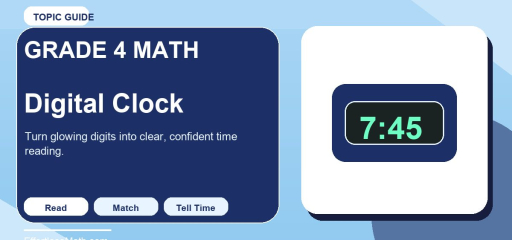
Digital Clock for 4th Grade: this Effortless Math guide explains the topic in plain language, shows how it works through solved examples, and gives you free practice to try immediately, so the idea sticks instead of staying abstract.
Digital clocks show time with numbers instead of hands. Students read the hour, the colon, and the minutes to tell the exact time quickly.
Fourth graders also begin connecting digital time to analog clocks and to daily schedules.
Key Ideas to Remember
- Read the hour and minute information separately before naming the full time.
- Use skip-counting by fives or a short timeline when the problem involves elapsed time.
- Check whether the final answer should be a clock time or a length of time.
Detailed Explanation
The first number or numbers show the hour and the last two digits show the minutes. When the minutes are less than 10, a zero is placed in front, such as 7:05.
Students should practice reading digital time aloud correctly, including saying zero-five as five minutes after the hour rather than fifty.
Worked Example
Problem: Read the digital time 7:45.
- The hour is 7.
- The minutes are 45.
- Say the time as seven forty-five.
Answer: 7:45 is read as seven forty-five.
Practice Tip
Show matching analog and digital times side by side so students learn to move easily between both forms.
Common Mistakes
Students usually improve faster in digital clock when they slow down and watch for a few repeated mistakes. These are the ones worth checking first:
- Mixing up the hour hand and minute hand on an analog clock.
- Counting minutes by ones instead of by fives around the clock face.
- Forgetting whether the question asks for a clock time or an elapsed interval.
Practice Strategy
A short but consistent review routine helps students build confidence with digital clock without getting overwhelmed.
- Read a few times from an analog or digital clock and explain how you know each answer.
- Create a short schedule for the day and solve one elapsed-time question from it.
- Use a number line to show how the minutes change from start time to end time.
Frequently Asked Questions
What is a digital clock?
A digital clock shows the time with numbers instead of hands. The number before the colon is the hour and the two digits after it are the minutes, so 7:45 means seven forty-five. Kids often find digital clocks easier to read at first, which is why fourth graders practice matching them with analog clocks to understand both ways of telling time.
Is a digital clock analog?
No. An analog clock uses an hour hand and a minute hand that move around a numbered face, while a digital clock displays the time directly as numbers. Both can show the same time in different forms. A good exercise is to read a digital time such as 3:15 and then sketch the analog version: the minute hand points to the 3 and the hour hand sits just past the 3.
How do you teach the digital clock?
Start by showing that the digits before the colon name the hour and the last two digits name the minutes. Then have students read times aloud, paying attention to times like 7:05, which is said as seven oh-five, not seven fifty. Placing digital and analog times side by side helps, and daily routines like lunch or recess give real times to read and compare.
What do the numbers on a digital clock mean?
On a digital clock, the first one or two numbers show the hour, from 1 to 12 on a 12-hour clock, and the last two digits show the minutes, from 00 to 59. When the minutes are under 10, a zero holds the place, as in 4:08. Many clocks also show AM or PM, and some use a 24-hour format where 15:00 means 3:00 PM.
Are there digital clock worksheets for grade 4?
Yes, digital clock worksheets for grade 4 are widely available and usually ask students to write the time shown, match digital and analog clocks, and solve short elapsed-time problems. For example, if a digital clock reads 2:40, what time will it be in 35 minutes? The answer is 3:15, since 20 minutes gets to 3:00 and 15 more gets to 3:15.
Keep Practicing
After finishing this lesson on digital clock, spend a few minutes on mixed review so the skill stays connected to the rest of Grade 4 math.
Need more Grade 4 review? Explore the Grade 4 Mathematics Worksheets hub for extra guided practice, review sets, and printable support.

Related to This Article
More math articles
- 3rd Grade NYSE Math Practice Test Questions
- Accuplacer Math FREE Sample Practice Questions
- Hawaii SBAC Grade 8 Math Free Worksheets: Printable Practice Worksheets with Worked Solutions
- 10 PSAT/NMSQT Math Practice Questions with Explanations
- Elements and the Periodic Table
- 2nd Grade Math Worksheets for Georgia: 34 Free Printable PDFs
- Hamilton’s Financial Program: Debt, Bank and Constitutional Debate
- How to Know the Difference Between Correlation and Causation
- Grade 6 Math: Area of Rectangles and Squares
- Free Grade 8 English Worksheets for Vermont Students

What people say about "Digital Clock for 4th Grade"?
No one replied yet.